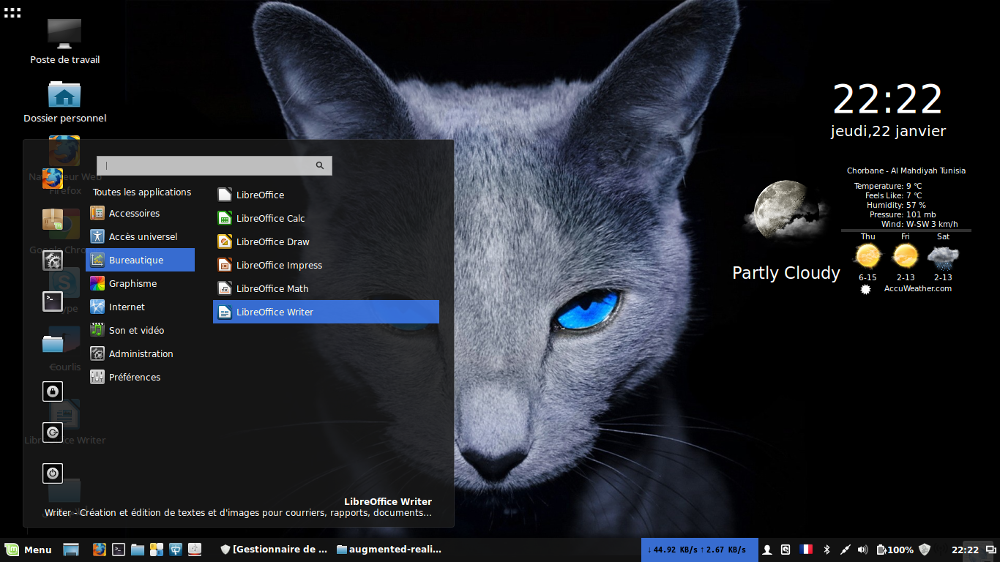
Flattr (icon theme), Icon Pack with the Flattest Icons for Linux Ubuntu, Linux Mint, Fedora, OpenSUSE, Mageia, Elementary OS, Debian, Redhat, Slackware, Mageia and Most Popular linux distro.
Linux users can choose from hundreds, if not more, of icons for their operating systems. There is something for everyone. If you don't like flat icons, you will surely find something you can use, no matter how different your tastes are from everyone else's.
When reporting missing icons make sure to follow these steps so we can resolve it faster:
For Linux:
- Add screenshots, images speak louder than words. Add a screenshot of the missing icon and the instances where it's displayed ` (menus, taskbars, panels, notifications, etc.).
- Use the following title prefix (without the quotes): "[Linux] App_name Desktop_environment" - that way we can tag them appropriately.
- Add the relevant launcher information, software in Linux DE uses files with the extension .desktop as launchers in menus (like Homerun, Mint menu, Gnome Shell overview, Unity, etc.), these launchers are stored in /usr/share/applications (there might be a /kde folder for KDE apps) for software installed through a package or the package manager. Applications such as Google Chrome apps install their launchers here: /home/$USER/.local/share/applications/. Simply open these files with a text editor and copy their contents into your issue.
- Add a description of the software, it's very important for us to know what the software does as we are not able to install every software under the sun and test them.
Some software uses hardcoded paths in their launchers, as such even when we add the icon the system will not load it, you may use Hardcoded Icon Fixer to resolve this problem.
Contributions
- You're allowed (and welcomed) to contribute icons to the icon theme, however, make sure to read the wiki to get up and close with the design guidelines.
- When creating pull requests make sure that your local copy is up to date before pushing changes.
- Add a preview of the icon to the pull request, in the size of the icon and a zoomed version.
Download
Icons are available to download directly from this repository. Simply clone it and move the resulting folder to the appropriate path.
In a Terminal execute the following command:
Icons are available to download directly from this repository. Simply clone it and move the resulting folder to the appropriate path.
In a Terminal execute the following command:
git clone https://github.com/NitruxSA/flattr-icons.git
Alternatively, click here.
Install
Move the folder(s) Flattr to /usr/share/icons
And finally select it in the Settings.