Showing posts with label mac. Show all posts

Tuesday, 19 May 2015

Plex Media Server 0.9.12.1 released, Install on Ubuntu, Linux Mint, Fedora, Mac OSX and CentOS

Plex Media Server 0.9.12.1 released, Install on Ubuntu 15.04 vivid Vervet, ubuntu 14.10 Utopic Unicorn, Ubuntu 14.04 Trusty Tahr (LTS), Ubuntu 13.10/13.04/12.04, Linux Mint 17.1 Rebecca, Linux Mint 17 Qiana, Fedora 22, Fedora 21, Fedora 20, CentOS 6 and CentOS 6


Plex Media Server is a powerful application that will help you to manage and stream media files stored on your computer to various mobile devices and smart TVs, across a local network or over the Internet.

The application can be downloaded for Chromcast, Roku, Google TV, and a supported Samsung Smart TV, as well as on Synology, Netgear, QNAP, unRAID, Drobo and ASUSTOR NAS (Network-attached storage) devices.

Features at a glance

With Plex Media Server, you can organize your movie, photo, music and TV show collections in order to access them easily and fast from one of the aforementioned devices and platforms.

It can serve content to clients on the same machine or within the local network, and even over the Internet. One of its best features is that it includes its own App Store, from where plug-ins can be installed and extend the default functionality of the software.

In addition to the free version reviewed here, there's also a PlexPass edition of Plex Media Server, which provides users with a paid service that gives them early access to new versions and premium features.


What's new in Plex Media Server 0.9.12.1:
  • New:
  • Enable iTunes importing code for UNIX; set advanced preference with path to library XML.
  • Support for decade-based filtering for movies and albums.
  • Add a hidden preference for sorting albums (AlbumSort, with default value "year:desc", you can set "year", "title", etc.).
  • Add a new library preference to tell scanner to respect media tags (for new libraries).
  • CentOS 7 support.
  • Fixes:
  • A crash shortly after startup.
  • (Linux) Crash on start.
  • (Windows) Scanner might not pick up new media, or might stop in the middle.
  • A few other crashes and minor stability issues.
  • Fix install/uninstall issues on Ubuntu/Mint.
  • Fixed possible issue locking out an alternate admin user on Synology

Install Plex Media Server 0.9.12.1 on Ubuntu, Linux Mint, Fedora, Mac OSX and CentOS

UBUNTU

Download For Ubuntu 32 bit

to install Plex Media Server 0.9.12.1 on Ubuntu 15.04 vivid Vervet, ubuntu 14.10 Utopic Unicorn, Ubuntu 14.04 Trusty Tahr (LTS), Ubuntu 13.10/13.04/12.04, Linux Mint 17.1 Rebecca, Linux Mint 17 Qiana, open a new Terminal window and bash (get it?) in the following commands:
$ sudo dpkg -i plexmediaserver_*.deb
In case “dpkg” indicates missing dependencies, complete the installation by executing the following command:
$ sudo apt-get install -f
FEDORA


Download for Fedora 32 bit
Download for Fedora 64 bit

to install Plex Media Server 0.9.12.1 on Fedora 22, Fedora 21, Fedora 20, open a new Terminal window and bash (get it?) in the following commands: 
$ sudo yum install plexmediaserver-*.rpm
CENTOS

Download for CentOS 32 bit
Download for CentOS 64 bit

to install Plex Media Server 0.9.12.1 on CentOS 6 AND 7, open a new Terminal window and bash (get it?) in the following commands: 
$ sudo yum install plexmediaserver-*.rpm
Enjoy! I hope this article adding you more clarity.

Tuesday, 28 April 2015

Darktable 1.6.6 is out, Install on Mac OSX, Ubuntu or Linux Mint via PPA

Darktable 1.6.6 ubuntu ppa / Darktable 1.6.6 ubuntu 15.04 vivid Vervet / Darktable 1.6.6 Linux Mint ppa / Darktable 1.6.6 ubuntu 14.10/14.04 ppa


Darktable is an open source application that provides both amateur and enthusiasts photographers with a virtual lighttable and darkroom that allows them to manage their digital negatives in a single and handy database. It has been designed from the ground up to be used for developing RAW images from digital cameras.

Features at a glance

Key features include an astonishing graphical user interface designed for the modern computer user, support for importing single image files, folders, and scan for devices, ability to categorize images by numerous filters, such as ISO, color label, rights, creator, publisher, camera, date, time, title, lens, aperture, etc., as well as to access recently used collections.

In addition, the application lets users to view detailed information about an image, if available, such as lens, exposure, aperture, focal length, focus distance, ISO, model, maker, filmroll, image id, filename, version, full path, width, height, copyright, local copy, date, time, title, creator, latitude, and longitude.

It also features fully non-destructive editing, 4x32-bit floating point pixel buffers, GPU acceleration via OpenCL, built-in ICC profiles (sRGB, XYZ, linear RGB and Adobe RGB), zero-latency fullscreen mode, tethered shooting, flexible search functionality, powerful export system, and many translations.

The program is capable of importing a wide range of standard, RAW and HRD image formats, among which we can mention JPG, CR2, HDR, and PFM, and can export images to Picasa and Flickr, as well as to export to low dynamic range (JPEG, PNG, TIFF), linear high dynamic range (PFM, EXR) and 16-bit (PPM, TIFF) images.

What's new in darktable 1.6.6:
  • fix the Olympus E330 support (which was accidentally broken in 1.6.4)
  • fix white balance reading for the Canon Powershot SX50 HS
  • white balance presets for RICOH GR
  • minor assorted bug fixes (masks, lens correction, profiled denoise, etc)

Darktable 1.6.6 is out, Install on Mac OSX, Ubuntu or Linux Mint via PPA

    To install Darktable 1.6.6 on Ubuntu 15.04 vivid Vervet, ubuntu 14.10 Utopic Unicorn, Ubuntu 14.04 Trusty Tahr (LTS), Ubuntu 13.10/13.04/12.04, Linux Mint 17.1 Rebecca, Linux Mint 17 Qiana, Linux Mint 13 Maya, Pinguy OS 14.04, Elementary OS 0.3 Freya, Elementary OS 0.2 Luna, Peppermint Five, Deepin 2014, LXLE 14.04, Linux Lite 2.0, Linux Lite 2.2 and other Ubuntu derivative systems via PPA, open a new Terminal window and bash (get it?) in the following commands:
    $ sudo add-apt-repository ppa:pmjdebruijn/darktable-release
    $ sudo apt-get update
    $ sudo apt-get install darktable

    The source and Mac Package is available now. Binary packages are in the process of being built, and will appear soon at their respective download locations.

    Thursday, 12 March 2015

    flareGet 4.1-80 Stable Released, Available for Ubuntu, Linux Mint, Debian, Fedora, Mandriva, OpenSuse, Arch Linux, Chakra Linux and many more...


    flareGet 4.1-80 Stable Released, Available for Ubuntu 15.04 vivid Vervet, ubuntu 14.10 Utopic Unicorn, Ubuntu 14.04 Trusty Tahr (LTS), Linux Mint 17.1 Rebecca, Linux Mint 17 Qiana, Linux Mint 13 Maya, Debian 8 "jessie", Debian 7 "wheezy", Fedora 22, Fedora 21, Fedora 20, Mandriva, OpenSuse, Arch Linux, Chakra Linux and many more...

    flareGet is a freeware product that provides users with a complex, full featured, multi-threaded, multi-segment and cross-platform download manager and accelerator that can easily replace the default download manager of popular web browsers, such as Mozilla Firefox, Google Chrome, Opera or Internet Explorer.


    It supports Windows XP/Vista/7/8 , Mac OS X 10.7+ and almost all 32 and 64 bit Debian, RPM and Pacman based Linux Distributions. The supported Linux Distributions include Ubuntu, Fedora, Mandriva, OpenSuse, LinuxMint, Arch Linux, Chakra Linux and many more...

    Features at a glance

    Key features include enhanced browser integration through add-ons, dynamic file segmentation algorithm for amazingly fast downloads, batch download, support for pausing and resuming unfinished downloads, on completion actions, YouTube video grabber, scheduler, proxy support, as well as intelligent file management.

    What's new in flareGet 4.1-80:
    • fixed failure of downloads with file size than 5KB
    • fixed the download dialog behaviour to display on top
    • fixed hiding of main window on closing to tray in Mac
    • fixed some minor UI issues
    • added notification for download start, if download dialog is disabled
    • improvements in queue manager
    • added support for showing files selected on opening in file manager
    • other minor bug fixes and improvements
    Download and Install on Ubuntu 15.04 vivid Vervet, ubuntu 14.10 Utopic Unicorn, Ubuntu 14.04 Trusty Tahr (LTS), Ubuntu 13.10/13.04/12.04, Linux Mint 17.1 Rebecca, Linux Mint 17 Qiana and Debian 8 "jessie", Debian 7 "wheezy", Debian 6:

    open a new Terminal window and bash (get it?) in the following commands:
    For Linux system 32 bit :
    $ wget -c http://flareget.com/files/flareget/debs/i386/flareget_4.1-80_i386.deb
    $ sudo dpkg -i flareget_4.1-80_i386.deb

    For Linux system 64 bit :
    $ wget -c hhttp://www.flareget.com/files/flareget/debs/amd64/flareget_4.1-80_amd64.deb
    $ sudo dpkg -i flareget_4.1-80_amd64.deb
    In case “dpkg” indicates missing dependencies, complete the installation by executing the following command:
    $ sudo apt-get install -f

    Download and Install on Fedora 22, Fedora 21, Fedora 20 and OpenSUSE 13.2, OpenSUSE 13.1 :

    open a new Terminal window and bash (get it?) in the following commands:
    For 32 bit :
    $ wget -c http://www.flareget.com/files/flareget/rpm/i386/flareget_4.1-80_i386(stable)_rpm.tar.gz
    For 64 bit :
    $ wget -c http://www.flareget.com/files/flareget/rpm/amd64/flareget_4.1-80_x86_64(stable)_rpm.tar.gz

    For Mac OSX 64 bit : Download i here

    For Arch Linux, Chakra Linux and other Pacman based Linux distributions.
    Download 32 bit | Download 64 bit

    FlareGet for Linux System Requirements:
    FlareGet is a native Linux application written in C++, using Qt framework. FlareGet will run on almost all desktop environments - GNOME, KDE, Unity, Cinnamon etc. To run FlareGet following minimum dependencies should be met:
    • Qt libraries with version >=4.8.1
    • glibc (C library) with version >=2.13
    FlareGet Issues:
    FTP support is limited. Only single threaded download is supported, with no resume and proxy support.

    Saturday, 14 February 2015

    Cutegram 2.0.0 released, available for Ubuntu/Linux Mint (PPA), OpenSUSE, Mageia, Chakra Linux and Mac OSX


    Cutegram 2.0.0 released, available for Ubuntu 15.04 vivid Vervet, ubuntu 14.10 Utopic Unicorn, Ubuntu 14.04 Trusty Tahr (LTS), Ubuntu 13.10/13.04/12.04, Linux Mint 17.1 Rebecca, Linux Mint 17 Qiana (PPA), OpenSUSE 13.1, OpenSUSE 13.2, Mageia 4, Mageia 5, Chakra Linux and Mac OSX

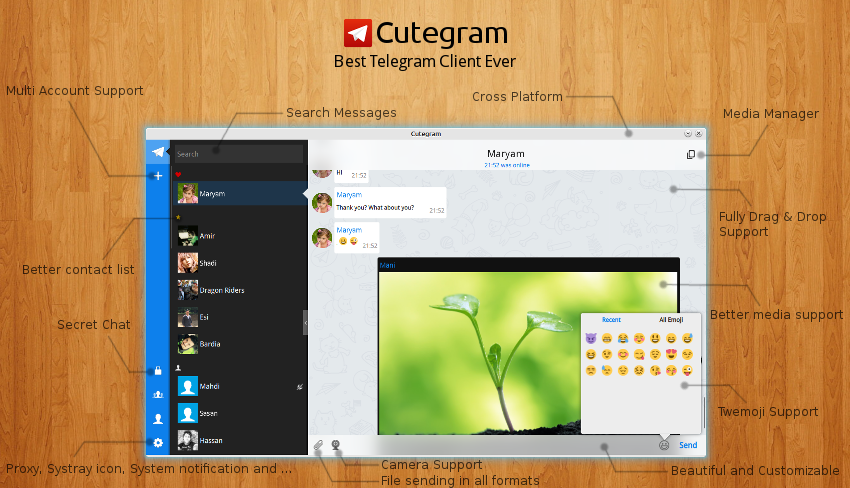
    Cutegram is a completely free and open source graphical software project that has been designed from the offset to act as a Linux client for the Telegram messaging service. It offers an attractive and modern graphical user interface implemented in Qt.

    Features at a glance
    Key features include support for sending and receiving files, support for the system tray area of many open source desktop environments, native desktop notifications, customizable fonts, Twitter emojis, as well as support for all GNU/Linux operating systems.

    Additionally, the software comes with complete drag & drop support for sending files, deleting messages and forwarding messages, an experimental secret chat, and a smooth and beautiful graphical user interface based on the latest QML technologies.

    Another interesting features is that the program is independent of a desktop environment, thus supporting GNOME, KDE, Xfce, LXDE, Cinnamon, MATE, LXQt, Openbox, Fluxbox, and other open source desktop environments/window managers.

    What's new in Cutegram 2.0.0:
    • Search
    • Secret Chat
    • Send text messages as document using drag and drop
    • Prxy support
    • Offline mode
    • Camera Button
    • Autostart option on Configure menu
    • Multi Account login (experimental)
    • Windowed Mode
    • ProgressBar on file sending
    • Cancel button on file downloading
    • Shared Media location
    • Many improvements on UserInterface
    • Better and Smarter drag and drop actions
    • Online status icon on contact avatars
    • Leave and Add person to chats
    • Delete History action
    • Chat with non-contact users
    • Add/Update translations.
    • Contact us menu to send suggestions to us
    • Linux, Windows and Mac support
    • Many other improvement and Bugfixes

    Install Cutegram 2.0.0 on Ubuntu/Linux Mint (PPA), OpenSUSE, Mageia, Chakra Linux and Mac OSX :

    to install Cutegram 2.0.0 on Ubuntu 15.04 vivid Vervet, ubuntu 14.10 Utopic Unicorn, Ubuntu 14.04 Trusty Tahr (LTS), Ubuntu 13.10/13.04/12.04, Linux Mint 17.1 Rebecca, Linux Mint 17 Qiana, Linux Mint 13 Maya, Pinguy OS 14.04, Elementary OS 0.3 Freya, Elementary OS 0.2 Luna, Peppermint Five, Deepin 2014, LXLE 14.04, Linux Lite 2.0, Linux Lite 2.2 and other Ubuntu derivative systems, open a new Terminal window and bash (get it?) in the following commands:

    For Linux system 32 bit :
    wget http://aseman.co/downloads/cutegram/2/cutegram_2.0.0-1-i386.deb

    For Linux system 64 bit :
    wget http://aseman.co/downloads/cutegram/2/cutegram_2.0.0-1-amd64.deb

    Installation, do :
    sudo dpkg -i cutegram_2.0.0-1-*.deb
    In case “dpkg” indicates missing dependencies, complete the installation by executing the following command:
    sudo apt-get install -f

    Cutegram 2.0.0 available on PPA Launchpad

    The source 32 & 64 bit is available now. Binary packages are in the process of being built, and will appear soon at their respective download locations.

    Download for Mac OS X

    Friday, 13 February 2015

    MKVToolnix 7.6.0 is out, The ultimate MKV (Matroska) manipulation software for Linux-based operating systems


    MKVToolnix 7.6.0 is out, available for Ubuntu, Linux Mint, Debian, Arch Linux, CentOS, Fedora, OpenSUSE, FreeBSD, Gentoo, Mandriva, Slackware, Windows and Zenwalk


    MKVToolnix is an open source set of command-line and graphical utilities that empower users to extract streams from MKV files, display information about MKV files, merge several MKV streams into one, and split Matroska media files. The resulting files from MKVToolnix can be played back with various media players on Linux/UNIX, or with the Matroska Direct Show filters under Windows operating systems.

    Supports a wide range of audio and subtitle formats

    In addition, the mkvextract program can be used to extract audio, subtitle and video tracks, chapters, tags, CUE sheets, attachments and timecodes from Matroska files. At the moment, it supports the following track types: H.264/AVC, RealVideo, Theora, VP8/VP9, MP2, MP3, AC3, raw PCM, AAC, OGG Vorbis, TrueAudio, ALAC, FLAC, WavPack, Opus, SSA, ASS, Kate, VobSub, and USF.

    Edit the properties of MKV files or view detailed information

    The mkvinfo program is capable of displaying detailed information about all the elements that are included in a Matroska file. It outputs a list of tracks and provides information about the codecs used in them.

    Advanced users can use the mkvpropedit tool to edit the properties of a MKV file without a complete remux. There’s also a GUI front-end for the mkvextract tool, called mmg, designed to used for editing a chapters and headers.

    Supported operating systems

    MKVToolnix is a platform-independent project that supports Linux (Gentoo, Arch Linux, CentOS, Red Hat Enterprise Linux, Fedora, Debian, Ubuntu, Mandriva, openSUSE, Slackware, Zenwalk), BSD (FreeBSD, NetBSD), Mac OS X and Microsoft Windows operating systems.


    What's new in MKVToolnix 7.6.0:
    • all programs: bug fix: Since release 7.0.0 the wrong exit code was used when warnings were finished (0 instead of 1). Fixes #1101.
    • mkvmerge: bug fix: Appending chapters with the same chapter UID was dropping all sub-chapters from the one of the two merged chapters. Now the sub-chapters are merged recursively as well.
    • mkvmerge: bug fix: The wrong Codec ID was written when reading PCM tracks from Matroska files in Big Endian byte order. Fixes #1113.
    • all: new feature: added a Serbian (Latin) translation of the programs by Danko (see AUTHORS).
    • mkvmerge: bug fix: If splitting was active and AC3 tracks read from Matroska files were shorter than a split point then the following output file would contain an AC3 packet with the timecode of 00:00:00 somewhere in the middle. Fixes #1104.
    • mmg: bug fix: If a chapter track from a Matroska file is selected then the »language« drop-down box is disabled. Fixes #1105.
    • mkvmerge: bug fix: On Windows the end-of-file-reached status wasn't tracked correctly for certain file operations. This could manifest in e.g. mkvmerge not finding tracks in MPEG transport streams when probing MPLS playlist files. Fixes #1100.
    • mmg: bug fix: When scanning for play lists the window presenting the results listed some properties in an unescaped way (e.g. »\s« instead of spaces).
    • mmg: bug fix: When adding MPLS files mmg was only offering to scan for more playlists if there were at least two additional MPLS files present. This has been fixed to one MPLS file (in addition to the one just added).

    For Full information about installation you can follow this page.

    Tuesday, 3 February 2015

    digiKam 4.7.0 is released, avaialable for (K)ubuntu, Debian, Fedora, OpenSUSE, Arch Linux and Mac OSX


    DigiKam 4.7.0 is released, avaialable for (K)ubuntu, Debian, Fedora, OpenSUSE, Arch Linux and Mac OSX

    digiKam is an open source project that provides users with a dedicated photo management solution, specifically designed to be deployed on KDE desktop environments. It includes image editor and organizer components, which can be easily extended through a built-in and powerful plugin architecture.

    Features at a glance

    Key features include red eyes correction, brightness, contrast, gamma, hue, saturation and luminosity correction, color balance, color inversion, color auto-correction, ratio cropping, free cropping, black & white and tonality converter using curves adjustments, rotation, and flipping.

    With this tool, you will be able to import pictures, organize your photo collection, view images, edit and enhance photos, create slideshows and calendars, print and share your photo creations using social web services, email images, and much more.

    What's new in digiKam 4.7.0:

    • This release includes many bugs fixes from Maik Qualmann who propose patches to maintain KDE4 version while KF5 port is under progress.

    DigiKam 4.7.0 is released, avaialable for (K)ubuntu, Debian, Fedora, OpenSUSE, Arch Linux and Mac OSX :

    How to install DigiKam 4.7.0 on Kubuntu 14.10, Kubuntu 14.04 and Linux Mint 17 KDE systems, using KDE 4.13 and non KDE Ubuntu 14.04 derivatives:

    $ sudo add-apt-repository ppa:philip5/extra
    $ sudo apt-get update
    $ sudo apt-get install digikam
    How to install DigiKam 4.7.0 on Kubuntu 14.10, Kubuntu 14.04 and Linux Mint 17 KDE systems, using KDE 4.14:

    $ sudo add-apt-repository ppa:philip5/kubuntu-backports
    $ sudo apt-get update
    $ sudo apt-get install digikam
    Optional, to remove DigiKam 4.7.0 from either Kubuntu 14.10, Kubuntu 14.04 and Linux Mint 17 KDE, do:
    $ sudo apt-get remove digikam


    Before you can use digiKam, you must first download and install it. There are three ways to do that:
    • Use a package provided by your operating system
      This is the preferred way. It is easy and stable, but it might be a version which is somewhat older.
    • Compile a tarball which we provide
      This is a bit more complicated, but you can install the most recent stable version.
    • Compile the KDE4 latest versions (git repository) where we currently work in.
      This is even more complicated, but as recent as it gets. This is needed when you want to help us to find bugs or help us develop.
    You can choose the one which fits you best. We provide detailed instructions for each of them.
    Note: check the dependencies before trying to compile digiKam.

    Friday, 30 January 2015

    DrawPile 0.9.8 is out, Available for Ubuntu, Linux Mint, Arch Linux, OpenSUSE and MAC OSX


    DrawPile 0.9.8 is out, Available for Ubuntu 15.04 vivid Vervet, ubuntu 14.10 Utopic Unicorn, Ubuntu 14.04 Trusty Tahr (LTS), Ubuntu 13.10/13.04/12.04, Linux Mint 17.1 Rebecca, Linux Mint 17 Qiana, Arch Linux, OpenSUSE 13.1, OpenSUSE 13.2 and MAC OSX 
     
    DrawPile is an open source and completely free graphical software implemented in C++/Qt and designed from the ground up to act as a collaborative drawing application that supports multiple operating systems.

    It is a sketching-oriented application that can be easily compared with the popular OpenCanvas software for the proprietary Microsoft Windows operating system. It includes various attractive features that we have listed in the next section.

    The previous release, while fixing important bugs, also introduces a couple of nasty regressions. Hopefully, I managed to squash them all for this release.
    Important bugs fixed are:
    • Unnecessary retcon at start of new strokes (improves performance)
    • Fixed regression in annotation tool (annotation moving/resizing was broken in previous release)
    • Fixed retconning of indirect strokes
    Feature enhancements include:
    • Menu bar is now shown when the cursor is brought to the top of the screen in full screen mode
    • UI language can now be selected explicitly via the settings dialog
    • Holding a tool shortcut key now switches to the tool temporarily. When the key is released, the old tool is restored.
    • A new "fill under" mode for the flood fill tool.
    How to install DrawPile 0.9.8 on Ubuntu 15.04 vivid Vervet, ubuntu 14.10 Utopic Unicorn, Ubuntu 14.04 Trusty Tahr (LTS), Ubuntu 13.10/13.04/12.04, Linux Mint 17.1 Rebecca, Linux Mint 17 Qiana, Arch Linux, OpenSUSE 13.1, OpenSUSE 13.2 and MAC OSX 
     
    Binary packages are available for certain distributions:
    If your distro is not listed, or the latest version has not been packaged yet, you can also build the application from sources.

    Tuesday, 20 January 2015

    Urban Terror 4.2.023 released, available for Linux, Mac OS X and Windows


    Urban Terror 4.2.023 which is probably the last version of the "4.2 era"

    Urban Terror is a unique, free, addictive, open source, fun and cross-platform FPS (first-person shooter) game developed by FrozenSand and designed to run on any Quake III Arena compatible engine. It features multiplayer capabilities and it’s described by its developers as a “Hollywood tactical shooter.” The game is available for Linux, Windows and Macintosh computers.

    What's New in This Release:
    • Fixed strat time causing early match termination
    • Fixed flag return message colour #176
    • Fixed negative team scores #177
    • Added s_alttabmute CVAR to control sound when game is in background. Values are: '1' for Mute (default) or '0' to keep sounds playing when game is in background. (Windows only)

    Key features include realism, numerous weapons, Counter-Strike elements, Quake III Arena elements (circle jumping), Unreal Tournament elements, support for mainstream operating systems, a dedicated Linux server for hosting Urban Terror game sessions without interruption, support for maps, weather affects, the ability to perform superhuman feats, and realistic damage system.

    In addition, the games comes with classic and extremely popular FPS modes, such as Capture the Flag and Team Deathmatch, as well as Free-for-All (deathmatch), Capture & Hold, Team Survivor, Follow the Leader and Bomb & Defuse. The Jump Mode and Last Man Standing game types are also included in Urban Terror.

    Download Urban Terror

    Sunday, 18 January 2015

    Kadu 1.5 released, install on debian, ubuntu/Linux Mint, OpenSUSE, Gentoo, Arch Linux, Mandriva and Mac OSX


    Kadu 1.5 released, install on debian, ubuntu/Linux Mint, OpenSUSE, Gentoo, Arch Linux, Mandriva and Mac OSX

    Kadu is an open source graphical software that provides users with a multi-protocol instant messaging solution for the Gadu-Gadu protocol. It supports GNU/Linux, Microsoft Windows and Mac OS X operating systems.

    The application is fully functional, good-looking and fully compatible with the widely used Jabber/XMPP protocol. It offers a familiar, user-friendly, easy to use and flexible graphical interface.

    What's New in This Release :
    • otr: #2895 fixed: strange error messages when using libotr5-4.1.0 (Vogel)
    • history: #2902 fixed: clear history menu item dissappears after a second (Vogel)
    Featured of Kadu :

    Among some of its major features, we can mention message encryption, file transfer support, graphical messages, emoticons, support for numerous plugins, easy and comprehensive configuration, as well as bot, annoyers and spammers protection.

    However, its power consists of the numerous standard plugins maintained by the Kadu developers, as well as external add-ons created and maintained by users. They add support for SMS, MPD media players, Growl notifications, and much more.

    Whether you want to encrypt your conversations, add sound support from external applications, set auto away messages, add custom notifications, add support for FALF media players, protect yourself against unwanted chats, or store chat history, you need a plugin.

    Install Kadu 1.5 on Debian 8 "jessie" (upcoming), Debian 7 "wheezy", Debian 6 "squeeze", Kali linux 1.0.9, Kali Linux 1.0.8 (and old version 1.0.7, 1.0.6, 1.0.5), KNOPPIX, Kanotix, Astra Linux, Blankon Linux 9.0 suroboyo,  Blankon Linux 8.0 rote , Blankon Linux 10.0 tambora (upcoming) and old version 7.0, Univention Corporate Server and debian derivative system :

    You can use the terminal instead and, as root, run:
    # apt-get install kadu
    Install Kadu 1.5 onUbuntu 15.04 vivid Vervet, ubuntu 14.10 Utopic Unicorn, Ubuntu 14.04 Trusty Tahr (LTS), Ubuntu 13.10/13.04/12.04, Linux Mint 17.1 Rebecca, Linux Mint 17 Qiana, Linux Mint 13 Maya, Pinguy OS 14.04, Elementary OS 0.3 Freya, Elementary OS 0.2 Luna, Peppermint Five, Deepin 2014, LXLE 14.04, Linux Lite 2.0, Linux Lite 2.2 and other Ubuntu derivative systems via PPA :
    sudo add-apt-repository ppa:patryk-prezu/ppa
    sudo apt-get update
    sudo apt-get install kadu
    sudo apt-get install kadu-external-modules kadu-themes

    Installation with YaST (OpenSUSE)

    Open YaST → Software management and type kadu in search box. Then choose packages from the list and confirm changes with Accept button.
    Installation with console

    Login as root and install kadu typing:
    su
    zypper in kadu
    You can also install additional packages so You can list them using:
    zypper se kadu

    For More information about intall kadu 1.5 on other linux distro you can read in this page.

    good luck !

    Friday, 16 January 2015

    SailfishOS SDK Alpha 1412 released, Available for Ubuntu, Debian, Rehat, Linux Mint, Fedora, OpenSUSE, Arch Linux, Mac OSX and Most Popular Linux Distro


    SailfishOS SDK Alpha 1412 released, Available for Ubuntu, Debian, Rehat, Linux Mint, Fedora, OpenSUSE, Arch Linux, Mac OSX and Most Popular Linux Distro

    SailfishOS SDK is a completely free, cross-platform and open source software implemented in Qt and designed from the offset to allow developers to easily and quickly develop mobile-optimized applications for the SailfishOS mobile operating system.

    What's New in version Alpha 1312
    • Updated Silica with Qt5, QtQuick2 and Wayland
    Based on the Qt Creator application

    The Software Deveopment Kit is actually using the Qt Creator application as an IDE (Integrated Development Environment) platform for developing flexible, stable and cutting-edge mobile applications for Sailfish OS.
    What is SailfishOS?

    Sailfish OS is an open source Linux-based mobile operating system that will be used in upcoming smartphones produced by Jolla, the same company that develops this SDK (Software Development Kit).

    SailfishOS SDK is a cross-platform software project. It is officially supported on the GNU/Linux, Microsoft Windows and Mac OS X operating systems, compatible with both 32 and 64-bit computer platforms.


    How to install SailfishOS SDK Alpha 1412 on Ubuntu, Debian, Rehat, Linux Mint, Fedora, OpenSUSE, Arch Linux and Most Popular Linux Distro :

    to install SailfishOS SDK Alpha 1412, open a new Terminal window and bash (get it?) in the following commands:

    For Linux system 32 bit :
    # wget -c http://releases.sailfishos.org/sdk/installers/1412/SailfishOSSDK-Beta-1412-Qt5-linux-32-offline.run
    # ./http://releases.sailfishos.org/sdk/installers/1412/SailfishOSSDK-Beta-1412-Qt5-linux-32-offline.run
    For Linux system 64 bit :
    # wget -c http://releases.sailfishos.org/sdk/installers/1412/SailfishOSSDK-Beta-1412-Qt5-linux-64-offline.run
    # ./http://releases.sailfishos.org/sdk/installers/1412/SailfishOSSDK-Beta-1412-Qt5-linux-64-offline.run
    Download for Mac OSX

    DrawPile 0.9.7 released, Available for Download (Mac OS X, Linux Mint, Ubuntu, OpenSUSE, Arch Linux)


    DrawPile 0.9.7 released, Available for Download (Mac OS X, Linux Mint, Ubuntu, OpenSUSE, Arch Linux)

    DrawPile is an open source and completely free graphical software implemented in C++/Qt and designed from the ground up to act as a collaborative drawing application that supports multiple operating systems.

    It is a sketching-oriented application that can be easily compared with the popular OpenCanvas software for the proprietary Microsoft Windows operating system. It includes various attractive features that we have listed in the next section.

    Key features include anti-aliased drawing, support for layers, multiple blending modes, support for tablet devices, support for text annotations, image rotation support, built-in chat, as well as an integrated server for hosting drawing sessions. A dedicated, standalone server is also available, offering support for multiple, persistent sessions.

    The program offers support for the OpenRaster file format, which means that it’s fully compatible with other open source painting/drawing applications, such as GIMP (GNU Image Manipulation Program), Krita and MyPaint.

    Another interesting feature is the ability to record drawing sessions, which can be played back a later time for research purposes. Each recording can be modified by removing individual events, undone actions or pauses. Playback capabilities including skipping forward or backward, as well as bookmarking.

    Among other interesting features, we can mention support for adjusting brush parameters, support for pressure sensitive Wacom tablets, support for simulating pen pressure based on velocity and stroke distance, support for multiple layers, and support for adjusting layer parameters, such as blending mode and transparency.
    This release fixes two major bugs discovered in the previous version:
    • The remote host selection dropdown would not work correctly if it contained more than one address
    • Drawpile would crash when reordering layers in certain circumstances
    Additionally, this release adds one very interesting new feature: lag-free painting in network mode. Previously, network latency was hidden (with varying success) by painting to a temporary layer while the drawing commands were making their way to the server and back. This worked OK for the basic brushes, but poorly with certain blending modes and not at all with the new Watercolor brush.

    The new version now lets local drawing happen immediately without waiting for the commands to finish their roundtrip. Of course, this open up the chance that brush strokes get applied in different order on different computers. This is where the new synchronization method comes in: when an inconsistency is detected (we draw something, but later find out someone else had drawn in the same spot earlier) the program will automatically undo the actions and then redo them in the correct order! In practice, this should happen very rarely, so this new method should actually be more efficient than the old preview based one. Those interested in the technical details can read more here.

    DrawPile 0.9.7 released, Available for Download (Mac OS X, Linux Mint, Ubuntu, OpenSUSE, Arch Linux) :

    Binary packages are available for certain distributions:
    If your distro is not listed, or the latest version has not been packaged yet, you can also build the application from sources.

    Thursday, 15 January 2015

    Krita 2.9 Beta 2 released, you can install on Ubuntu, Linux Mint, Mac OS X, Fedora, OpenSUSE and Gentoo


    Krita 2.9 Beta 2 released, you can install on Ubuntu 15.04 vivid Vervet, ubuntu 14.10 Utopic Unicorn, Ubuntu 14.04 Trusty Tahr (LTS), Ubuntu 13.10/13.04/12.04, Linux Mint 17.1 Rebecca, Linux Mint 17 Qiana, Linux Mint 13 Maya, Pinguy OS 14.04, Elementary OS 0.3 Freya, Elementary OS 0.2 Luna, Peppermint Five, Deepin 2014, LXLE 14.04, Linux Lite 2.0, Linux Lite 2.2, Mac OS X, openSUSE 13.2, openSUSE 13.1, openSUSE 12.3/12.2/12.1, Fedora 21, Fedora 20, Fedora 19, Fedora 18 and Gentoo
     
    Krita is an open source application that provides users with a sophisticated graphical software for creating amazing paintings, drawings, sketches, and any other type of artwork. It was previously distributed as part of the deprecated KOffice office suite for the KDE desktop environment.

    What's New in version 2.9 Beta 2  :
    • Fixes and improvements with how actions and shortcuts are managed. This will help fix a lot of shortcut conflicts that existed in the past. Actions and functionality are smarter now as well. This means that buttons and menu items will be disabled/enabled when they are not available. (eg. You cannot change the canvas size if there is no documents open).
    • add drag and drop when there are no documents open
    • make the background configurable with a color or image (located in Settings > Configure Krita)
    • fixed a lot of multiple document bugs
    • rename “hairy” brush engine to “bristle” brush engine
    • add “flatten” action to layer context menu
    • PDF export – landscape and portrait now work correctly
    • initial tool when loaded is freehand brush
    • don’t show menu icons unless you are using KDE
    • added a lot of presets for color profiles from Elle Stone
    • fix handling of locked dockers behaves better when changing workspaces
    • make it possible to convert images using ‘krita –export bla.png –export-filename bla.jpg’
    • fix crash when mergine a multi-selection of layers that includes a group layer
    • Removed the selection brush; use the global selection mask and the regular brush tools instead
    • Make krita open new images in the current window
    • On Linux: use colord to get the system monitor profile, and make the system monitor profiles work in a multi-monitor setup
    • Fix the layout of the filter and filter layer dialogs.
    • Make it possible to use different OpenColorIO settings for each canvas
    • Improve startup speed on all platforms
    • Mirror axis tools now follow the rotation of the canvas
    • fix rotation in brush preview
    • fixed loading assistants
    • fixed toggling of painting assistants
    • improve how the color slider widget is used
    • resource bundle fixes with paint operations, loading tags, and double loading resources
    • prevent loading corrupt resource bundles (added MD5 Checksums)
    • fix lockup with perspective assistants
    • improve the color smudge brush engine so it doesn’t darken too much
    • lots of fixes for working with resource bundles
    • bug fixes when selecting shapes
    • fixed some computer systems that weren’t loading preset bundles correctly
    • fixed color selector crashes when no document open
    • fix switching between landscape and portrait orientation
    • lots of fixes with handling multiple open images and the dockers
    • update gmic to version 1.6.0.3
    • enable interactive filters like colorize [interactive]
    • implement progress reporting when applying filter
    • if gmic script fails, inform user about the error message
    • fixed lost filtering when you select filter and click ok
    • fixed a bunch of multi-document specific issues
    • fixes when selecting colors with the advanced color selector
    • brush sizes are back to having 2 decimals to prevent issues
    • fixed a few bugs related to the crop tool with properties and resetting
    • fixed saving split alpha mask
    • fixed a lot of bugs in the dirty presets feature
    • fixed mirror tool working with shapes like circles and rectangles
    • fix shaky lines on 32-bit systems when using canvas rotation
    • fixes to the cage transform tool
    • Improve handles for the transform tool
    • fixes to the opacity slider
    • fixes to the tablet handling (make working with vector shapes with the tablet possible again)
    • make the liquify tool handle build-up/wash mode properly
    • new color smudge presets
    • Fix a bunch memory leaks and double deletions
    • Fix crash when adding drop shadow effect
    • Fix crash when closing a document while moving the stylus
    • Fix the opengl canvas for some (notably AMD drivers). More fixes coming up!
    • updated layout for resource manager
    • mirror tools have updated UI
    • G’MIC has been moved to filters in the menu
    • Resource manager has moved to settings
    • “Size Canvas to Size of Current Layer” is renamed to “Trim to Current Layer” and “Size Canvas to Size of Selection” is renamed to “Trim to Selection”
    • Lots of warnings fixed that only show up with clang, quite a few of which unconvered real bugs.
    • Fix thumbnailing for .kra and .ora files
    • Add a shortcut to toggle the assistants on and off
    • Fix pasting text in a multi-line text shape


    To install Krita 2.9 Beta 2 on Ubuntu / Linux Mint :

    To get the last stable version use the following PPA:
    sudo add-apt-repository ppa:kubuntu-ppa/backports
    sudo apt-get update
    sudo apt-get install krita
    sudo apt-get install kritasketch (otherwise you won't have the sketch brush in 2.8.0)
    kbuildsycoca4
    If you have any type of *Buntu system, you can also get the bleeding edge build from Dmitry's Krita Lime PPA. It will be right off the master branch, so be prepared if it might have some kinks. Also check out Dmitry's Kria Lime post about installing and getting things set up.


    Install Krita 2.9 Beta 2 on OpenSUSE

    Visit KDE_repositories to find which repository fits your needs.


    Install Krita 2.9 Beta 2 on Fedora

    Fedora packages are available in the unstable repository of the KDE Packaging Project.


    Install Krita 2.9 Beta 2 on Gentoo

    The e-build for Calligra Suite is in the portage tree as: app-office/calligra-2.7.00. You can use this to install Krita as well; there might be newer versions as well.

    For Mac OSX 10.9

    Mac OSX is very experimental right now and unstable. You can download the latest binary if you want. It has only been reported to work with Mac OSX 10.9.

    Wednesday, 14 January 2015

    jAlbum 12.4 released, web photo album generator software compatible with Linux, Windows and Mac

    jAlbum 12.4 released : A popular web photo album generator software compatible with Linux Mint, Ubuntu, Debian, Opensuse, Fedora, Redhat, CentOS and Mac OS X

    jAlbum is a commercial and cross-platform application that allow anyone to create professional and astonishing digital, web-based photo albums with minimal effort.
    What's New in This Release:
    • News and Updates:
    • Consumes far less RAM memory when making large albums
    • Font size for jAlbum's user interface now configurable under Preferences
    Key features include easy to use graphical user interface, compatibility with any modern web browser for viewing the generated photo albums, EXIF support, image filters, professional-grade album functions, and support for multiple languages.

    In addition, it provides users with a highly customizable photo album appearances, an easy to use wizard dialog for generating albums, integrated file transfer (FTP) client, as well as the ability to create albums with comments and text.

    Thanks to a great selection of skins that are built into the application, it allows users to effortlessly create beautiful photo and video websites with only a few mouse clicks. More skins are easily downloadable from the project’s website.

    For each skin, the program also allows users to add a different background image or pattern, as well as custom fonts, called styles. By default, it comes with different styles for each skin, making the software truly customizable.

    jAlbum 12.4 on Ubuntu, Linux Mint and Debian Derivative system :

    To Install/Update jAlbum 12.4 on Ubuntu 15.04 vivid Vervet, ubuntu 14.10 Utopic Unicorn, Ubuntu 14.04 Trusty Tahr (LTS), Ubuntu 13.10/13.04/12.04, Linux Mint 17.1 Rebecca, Linux Mint 17 Qiana, Linux Mint 13 Maya, Pinguy OS 14.04, Elementary OS 0.3 Freya, Elementary OS 0.2 Luna, Peppermint Five, Deepin 2014, LXLE 14.04, Linux Lite 2.0, Linux Lite 2.2 and other Ubuntu derivative systems, open a new Terminal window and bash (get it?) in the following commands:

    Download jAlbum 12.4 :
    $ sudo wget -c http://download.jalbum.net/download/12.4/Linux/NoVM/jalbum_12.4-1_all.deb
    Install jAlbum 12.4 :
    $ sudo dpkg -i jalbum_12.4-1_all.deb
    In case “dpkg” indicates missing dependencies, complete the installation by executing the following command:
    sudo apt-get install -f

    jAlbum 12.4 on Fedora, OpenSUSE, CentOS :

    Install jAlbum 12.4 on CentOS 6.5, CentOS 7, openSUSE 13.2, openSUSE 13.1, openSUSE 12.3/12.2/12.1, Fedora 21, Fedora 20, Fedora 19 :

    For OpenSUSE :
    wget -c http://download.jalbum.net/download/12.4/Linux/NoVM/jalbum-12.4-1.noarch.rpm
    sudo zypper install jalbum-12.4-1.noarch.rpm
    For Fedora & CentOS :
    wget -c http://download.jalbum.net/download/12.4/Linux/NoVM/jalbum-12.4-1.noarch.rpm
    sudo yum install jalbum-12.4-1.noarch.rpm
    Download for Mac OS X