Showing posts with label ppa. Show all posts

Friday, 5 June 2015

Install Vivaldi 1.0.190.2 Tech Preview 3 on Ubuntu/Linux Mint and Fedora/CentOS


Vivaldi 1.0.190.2 Tech Preview 3 Released, you can install on Fedora 22, Fedora 21, Fedora 20, CentOS 6 and Ubuntu 15.04 vivid Vervet, ubuntu 14.10 Utopic Unicorn, Ubuntu 14.04 Trusty Tahr (LTS) or Linux Mint 17.1 Rebecca, Linux Mint 17 Qiana and ubuntu derivative system

Vivaldi is a feature-rich, next-generation web browser application based on the powerful and open source Chromium project, from which the popular Google Chrome web browser is derived. The application is freely distributed and cross-platform, created by the former CEO of Opera Software, built using modern Web technologies like React, JavaScript, Node.js, and Browserify.

A web browser designed for you

The main goal of the Vivaldi project is to make a highly flexible, low on resources and extremely fast web browser software that works across all mainstream computer operating systems, a web browser that is rich in functionality and designed for you, the user.

New in Vivaldi 1.0.190.2 Tech Preview 3:
  • VB-5717 - Select in searchfield dropdown should invoke search
  • VB-5716 - Not whole urlstring selected when focusing addressfield
  • VB-5666 - Fast-forward does not always activate when supposed to
  • VB-5593 - Settings page navigation menu doesn't work
  • VB-5043 - View-source urls doesn't work in Vivaldi
  • VB-4992 - Inline search doesn't globally register esc
  • VB-4284 - Disable url prediction service break keyword search in url bar
  • VB-3878 - Vivaldi can't be installed without admin privileges
  • VB-1489 - Autocomplete on URL instead of nickname
  • VB-5709 - Can no longer set new single-key shortcuts while they are disabled
  • VB-5559 - Use tab “thumbnail” instead of “tooltip”
  • VB-5446 - Add zoom UI slider to settings
  • VB-4756 - Add option to disable mouse-gesture
  • VB-5829 - Space does not work in settings search
  • VB-5816 - Use vivaldi:settings URL instead of vivaldi:settingspage
  • VB-5766 - Tab stack tooltip not highlighted on hover
  • VB-4175 - Add support for changing start-page background
  • VB-5922 - It is impossible to make form widgets focused with SpatNav active
  • VB-5920 - Spatnav doesn't fire mouseleave event
  • VB-5891 - Make tabs on the sides resizable
  • VB-5373 - Auto-update for Vivaldi, on Mac OS
Download (1.0.90.2)

How to install Vivaldi 1.0.190.2 Tech Preview 3 on Ubuntu or Linux Mint :

To Install/Update Vivaldi 1.0.190.2 Tech Preview 3 on Ubuntu 15.04 vivid Vervet, ubuntu 14.10 Utopic Unicorn, Ubuntu 14.04 Trusty Tahr (LTS), Ubuntu 13.10/13.04/12.04, Linux Mint 17.1 Rebecca, Linux Mint 17 Qiana, Linux Mint 13 Maya, Pinguy OS 14.04, Elementary OS 0.3 Freya, Elementary OS 0.2 Luna, Peppermint Five, Deepin 2014, LXLE 14.04, Linux Lite 2.0, Linux Lite 2.2 and other Ubuntu derivative systems, open a new Terminal window and bash (get it?) in the following commands:
 

Install on ubuntu 64 bit :
$ sudo dpkg -i vivaldi-snapshot_1.0.190.2-1_amd64.deb
Install on ubuntu 32 bit :
$ sudo dpkg -i vivaldi-snapshot_1.0.190.2-1_i386.deb

In case “dpkg” indicates missing dependencies, complete the installation by executing the following command:
$ sudo apt-get install -f

How to install Vivaldi 1.0.190.2 Tech Preview 3 on Fedora or CentOS :

To Install/Update Vivaldi 1.0.190.2 Tech Preview 3 on Fedora 22, Fedora 21, Fedora 20 and CentOS 6, CentOS 5, open a new Terminal window and bash (get it?) in the following commands:

Install on Fedora / CentOS 64 bit : 
$ sudo yum install vivaldi-snapshot-1.0.190.2-1.x86_64.rpm

Install on Fedora / CentOS 32 bit : 
$ sudo yum install vivaldi-snapshot-1.0.190.2-1.i386.rpm

Released Announce

Install CherryTree 0.35.8 on Ubuntu or Linux Mint via PPA

Install CherryTree 0.35.8 on Ubuntu or Linux Mint via PPA

How to Install CherryTree 0.35.8 on Ubuntu 15.04 vivid Vervet, ubuntu 14.10 Utopic Unicorn, Ubuntu 14.04 Trusty Tahr (LTS) or Linux Mint 17.1 Rebecca, Linux Mint 17 Qiana and other derivative system via PPA

CherryTree is an open source and multi-platform application designed from the ground up to be used as a sophisticated and hierarchical note-taking utility under the GNU/Linux platform. It is also compatible with the Microsoft Windows operating systems.

Features at a glance
Key features include rich text, syntax highlighting, handling of images, lists, simple tables and codeboxex, alignment of text, tables, codeboxes and images, password protection, spell checking, hyperlinks, copy/paste functionality from other apps, support for copying a list of files, and storing of data in a single XML or SQLite file.

In addition, it allows users to print and save selections, nodes, subnodes or entire trees as PDF files, as well as to export them to HTML or Plain Text files. It can generate ToC (Table of Contents), search and replace nodes, import data from HTML, Plain Text, other CherryTree installation, Gnote, Keepnote, Tomboy, and other applications.


CherryTree 0.35.8 changelog
  • protected documents: better checks at extraction time to cope with 7zip extracting zero size files after a wrong password
  • protected documents bugfix: windows 7za.exe wrong path detected causing wrong password error
  • import from plain text file in WIN_OS allow user to select an extension different than txt (in linux any text file is automatically detected)
  • changed behaviour of HOME and END key presses in text: at first press move the cursor to start or end of the line, at second go to smart start or end (start or end excluding spaces)
  • dialog tablecolumnhandle: change active radiobutton with Tab and auto focus to text entry
  • added support for Scala programming language (from gtksourceview-3.0/language-specs)
  • bugfix in import from html and notecase and nested span tags
  • bugfix: changing a node syntax highlighting from code to plain text and vice versa did not update the font
  • bugfix: if a node has the read only property set, do not let the user change the node type
  • bugfix: after changing node type from rich to non rich text, the undo removes all text
  • bugfix: preferences dialog, the timestamp format help button was linked to a web page listing options not implemented in the python version; now the link goes to the exact python implementation


Install CherryTree 0.35.8 on Ubuntu or Linux Mint via PPA

To Install/Update CherryTree 0.35.8 on Ubuntu 15.04 vivid Vervet, ubuntu 14.10 Utopic Unicorn, Ubuntu 14.04 Trusty Tahr (LTS), Ubuntu 13.10/13.04/12.04, Linux Mint 17.1 Rebecca, Linux Mint 17 Qiana, Linux Mint 13 Maya, Pinguy OS 14.04, Elementary OS 0.3 Freya, Elementary OS 0.2 Luna, Peppermint Five, Deepin 2014, LXLE 14.04, Linux Lite 2.0, Linux Lite 2.2 and other Ubuntu derivative systems, open a new Terminal window and bash (get it?) in the following commands:
sudo add-apt-repository ppa:vincent-c/cherrytree
sudo apt-get update
sudo apt-get install cherrytree
to remove, do :
sudo apt-get remove cherrytree
Enjoy! I hope this article adding you more clarity.

Thursday, 4 June 2015

How to Install Mozilla Firefox 38.0.5 (Stable) on Ubuntu or Linux Mint via PPA


How to Install Mozilla Firefox 38.0.5 (Stable) on Ubuntu 15.04 vivid Vervet, ubuntu 14.10 Utopic Unicorn, Ubuntu 14.04 Trusty Tahr (LTS) or Linux Mint 17.1 Rebecca, Linux Mint 17 Qiana and other ubuntu derivative system via PPA
The Mozilla Firefox project is a redesign of Mozilla's browser component, written using the XUL user interface language and designed to be cross-platform, supporting Linux, Android, Microsoft Windows and Mac OS X operating systems. It is a fast, small and very easy-to-use web browser/navigator/explorer that offers many advantages over other similar products, such as the ability to block pop-up windows and the feature-rich tabbed browsing experience.

Features at a glance


The application offers a well designed graphical user interface that integrates search (powered by Google, Bing, Yahoo, etc.), and industry leading accessibility with Find As You Type - find links and page text by simply typing. As mentioned before, the Firefox browser features comprehensive pop-up controls, which will keep unwanted advertising off your desktop. A tab browsing mode will let you open several pages in a single window, allowing you to load links in the background without leaving the page you're on.

Mozilla Firefox 38.0.5 changelog
  • Keep track of articles and videos with Pocket
  • Clean formatting for articles and blog posts with Reader View
  • Share the active tab or window in a Hello conversation
  • A race condition that would cause Firefox to stop painting when switching tabs
  • Fixed graphics performance when using the built-in VGA driver on Windows 7

How to Install Mozilla Firefox 38.0.5 (Stable) on Ubuntu or Linux Mint via PPA

To Install/Update Mozilla Firefox 38.0.5 on Ubuntu 15.04 vivid Vervet, ubuntu 14.10 Utopic Unicorn, Ubuntu 14.04 Trusty Tahr (LTS), Ubuntu 13.10/13.04/12.04, Linux Mint 17.1 Rebecca, Linux Mint 17 Qiana, Linux Mint 13 Maya, Pinguy OS 14.04, Elementary OS 0.3 Freya, Elementary OS 0.2 Luna, Peppermint Five, Deepin 2014, LXLE 14.04, Linux Lite 2.0, Linux Lite 2.2 and other Ubuntu derivative systems via PPA, open a new Terminal window and bash (get it?) in the following commands:
sudo add-apt-repository ppa:ubuntu-mozilla-security/ppa
sudo apt-get update
sudo apt-get install firefox
to Uninstall, do :
sudo apt-get remove firefox
Enjoy! I hope this article adding you more clarity.

Saturday, 30 May 2015

Install & Update Wine 1.7.44 on Ubuntu or Linux Mint via PPA

Install & Update Wine 1.7.44 on Ubuntu 15.04 vivid Vervet, ubuntu 14.10 Utopic Unicorn, Ubuntu 14.04 Trusty Tahr (LTS) or Linux Mint 17.1 Rebecca, Linux Mint 17 Qiana via PPA  


Wine stands for "Wine is not an emulator" and it is an open source command-line software that's capable of translating Windows API calls into POSIX calls on-the-fly for integrating Windows applications into your Linux/UNIX desktop. For regular Linux users, the above means that the Wine software will allow them to run applications which are designed to be installed only on Microsoft Windows operating systems.

It's not a virtual machine or an emulator
However, Wine should not be confused with a virtual machine or an emulator. It provides binary compatibility, support for graphics, sound interaction, as well as support for modems, networks, scanners, tablets, keyboards, and other devices. The software’s API allows developers to integrate Wine in their projects, and as a result, numerous graphical user interfaces, both free and commercial, appeared on the Internet over the years.

The Wine development release 1.7.44 is now available.
What's new in this release:
  • More support for the COM interfaces of the RichEdit control.
  • Initial version of a SmartTee filter.
  • Some more support for the ARM64 platform.
  • Support for the null device kernel object.
  • Various bug fixes.
The source is available now. Binary packages are in the process of being built, and will appear soon at their respective download locations.

Update/Install Wine 1.7.44 on Ubuntu or Linux Mint via PPA

To Install/Update WineHQ 1.7.44 on Ubuntu 15.04 vivid Vervet, ubuntu 14.10 Utopic Unicorn, Ubuntu 14.04 Trusty Tahr (LTS), Ubuntu 13.10/13.04/12.04, Linux Mint 17.1 Rebecca, Linux Mint 17 Qiana, Linux Mint 13 Maya, Pinguy OS 14.04, Elementary OS 0.3 Freya, Elementary OS 0.2 Luna, Peppermint Five, Deepin 2014, LXLE 14.04, Linux Lite 2.0, Linux Lite 2.2 and other Ubuntu derivative systems via PPA, open a new Terminal window and bash (get it?) in the following commands:
sudo add-apt-repository ppa:ubuntu-wine/ppa
sudo apt-get update
sudo apt-get install wine1.7 winetricks
Optional, to remove Wine 1.7.44 and winetricks, open a new Terminal window and bash (get it?) in the following commands:
sudo apt-get remove wine1.7 winetricks
How to Completely removing Wine:
sudo apt-get remove wine
rm -rf $HOME/.wine
rm -f $HOME/.config/menus/applications-merged/wine*
rm -rf $HOME/.local/share/applications/wine
rm -f $HOME/.local/share/desktop-directories/wine*
rm -f $HOME/.local/share/icons/????_*.xpm
Enjoy! I hope this article adding you more clarity.

Friday, 22 May 2015

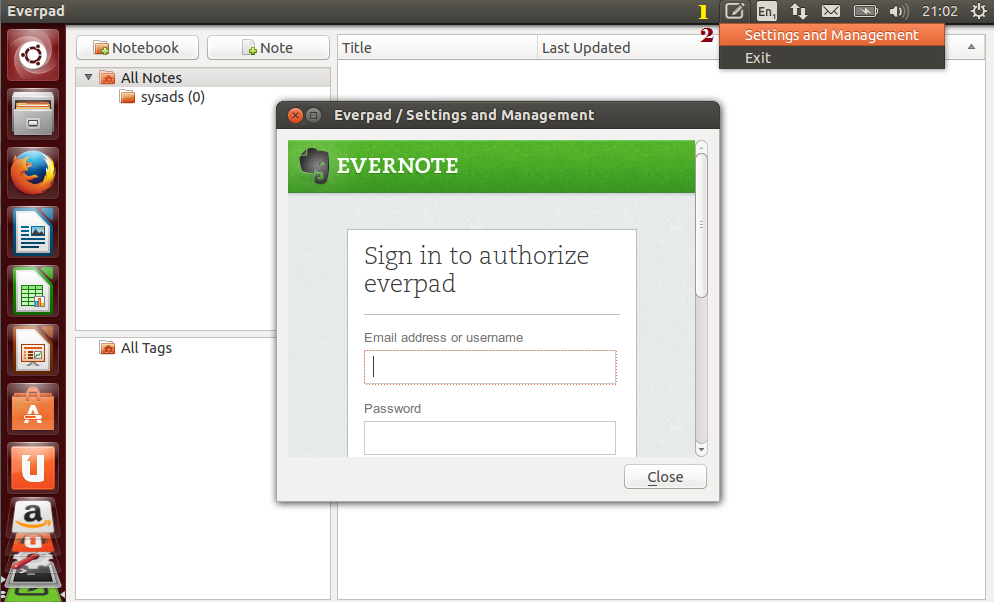
How to Install Everpad 2.15.8 on Ubuntu 15.04 vivid Vervet via PPA

How to Install Everpad 2.15.8 on Ubuntu 15.04 vivid Vervet via PPA


Everpad is now available for install on Ubuntu 15.04 via its PPA repository. Everpad as we know is the Linux client equivalent for Evernote available only in Windows. It works great and is fully integrated with Ubuntu Unity lens, indicator applet and unity launcher. The client Linux client supports notes, tags, notebooks, resources and places.

Everpad Evernote client is well integrated with Linux desktop and the  Everpad Client has:
  • unity lens
  • indicator applet
  • unity launcher
The Everpad Client supports Notes, Tags, Notebooks, Resources, Places, En-* tags

How to Install Everpad 2.15.8 on Ubuntu 15.04 vivid Vervet via PPA

to Install Everpad 2.15.8 on Ubuntu 15.04 vivid Vervet via PPA and other Ubuntu derivative systems, open a new Terminal window and bash (get it?) in the following commands:
sudo add-apt-repository ppa:nvbn-rm/ppa
sudo apt-get update
sudo apt-get install everpad
Run via terminal :
everpad
Enjoy! I hope this article adding you more clarity.

Install LibreOffice 4.4.3 on Ubuntu or Linux Mint via PPA

Install LibreOffice 4.4.3 on Ubuntu 15.04 vivid Vervet, ubuntu 14.10 Utopic Unicorn, Ubuntu 14.04 Trusty Tahr (LTS) or Linux Mint 17.1 Rebecca, Linux Mint 17 Qiana via PPA 


LibreOffice is an open source productivity suite that provides all the necessary office components for small-business, educational and non-profit organizations. It is a fork of the well-known OpenOffice.org application.

LibreOffice 4.4.3 changelog

Filters
  • Improved OOXML support
  • Improved Visio support
  • Improved Table of Contents in HTML export
  • Document thumbnails
  • Improved MS Publisher support
  • Improved Abiword support
  • Improved MS Works Spreadsheet support
  • Improved FictionBook support
Localization
  • New languages/locales with locale data
  • Improved language tools (spell-check dictionaries, thesaurus, hyphenation patterns)
API changes
  • OSL macro clean-up
  • IReference and ReferenceObject
  • UNO API changes
  • UNO API removals
GUI
  • Dialogs conversion to WidgetLayout finished
  • Sifr as the default icon theme on OS X
  • Changes to rulers
  • Start Center
  • New default templates
  • New color selector
  • Reworked paragraph line spacing dropdown
  • Bullet and Numbering dropdown
  • Sidebar changes
  • Context menu changes
  • Edit / Read-only mode
  • Tab changes
  • Firefox Themes
  • Image scaling
  • Simplification of Special Character dialog
  • Icon improvements
  • Locale in About dialog
  • UI text improvements
Writer
  • Master Document Templates
  • Shapes can have a TextBox
  • Improvements to Track Changes
  • Style dropdown
  • Line numbering easier to apply for headers and footers
  • Status bar improvements
  • Toolbar improvements
  • Navigator bookmarks
  • AutoCorrect improvements
Calc
  • Statistics Wizard (alternative to Excel’s Add-in “Analysis ToolPak”)
  • Direct conversion of formulas into static values
  • Formula engine
  • Toolbar improvements
  • Sheet context menu
Impress and Draw
  • Text of Master View Object Previews
  • Select and toggle off master elements directly via Delete
  • OpenGL transitions
  • Page Title field
  • Inherit current style of cells when inserting New row/column in table
  • Password for editing
  • Printing: use specified paper size
  • Zoom Mode button
  • Toolbar improvements
  • Menubar improvements
See changelog for full details.

Install LibreOffice 4.4.3 on Ubuntu or Linux Mint via PPA :

To install LibreOffice 4.4.3 on Ubuntu 15.04 vivid Vervet, ubuntu 14.10 Utopic Unicorn, Ubuntu 14.04 Trusty Tahr (LTS), Ubuntu 13.10/13.04/12.04, Linux Mint 17.1 Rebecca, Linux Mint 17 Qiana, Linux Mint 13 Maya, Pinguy OS 14.04, Elementary OS 0.3 Freya, Elementary OS 0.2 Luna, Peppermint Five, Deepin 2014, LXLE 14.04, Linux Lite 2.0, Linux Lite 2.2 and other Ubuntu derivative systems, open a new Terminal window and bash (get it?) in the following commands:
sudo apt-get remove --purge libreoffice*
sudo add-apt-repository ppa:libreoffice/ppa
sudo apt-get update
sudo apt-get install libreoffice
The source is available now. Binary packages are in the process of being built, and will appear soon at their respective download locations.

FFmpeg 2.6.3 “Grothendieck” is out, Install on Ubuntu or Linux Mint via PPA

FFmpeg 2.6.3 “Grothendieck”  is out, Install on Ubuntu 15.04 vivid Vervet, ubuntu 14.10 Utopic Unicorn, Ubuntu 14.04 Trusty Tahr (LTS), Ubuntu 13.10/13.04/12.04, Linux Mint 17.1 Rebecca, Linux Mint 17 Qiana, Linux Mint 13 Maya, Pinguy OS 14.04, Elementary OS 0.3 Freya, Elementary OS 0.2 Luna, Peppermint Five, Deepin 2014, LXLE 14.04, Linux Lite 2.0, Linux Lite 2.2 and other Ubuntu derivative systems via PPA


FFmpeg is the leading multimedia framework, cross-platform solution that is used to decode, encode, transcode, mux, demux, stream,filter and play any audio or video files. A notable addition to this release is the support for NVENC — the Nvidia Video Encoder interface for H.264 encoding.

FFmpeg 2.6.3 changelog
  • diracdec: prevent overflow in data_unit_size check
  • ffmpeg: remove incorrect network deinit
  • avformat/avidec: add mp2 to the list of exceptions… n2.6.3
  • avformat/mov: Fix parsing short loci
  • avformat/mov: Print reason of loci parsing failure
  • avcodec/hevc: Fix typo in num_entry_point_offsets check
  • avcodec/libtheoraenc: Check for av_malloc failure
  • avcodec/dcadec: Check active_bands
  • avcodec/dcadec: Check scale table index
  • avcodec/sonic: check memory allocations
  • avcodec/shorten: More complete pred_order check
  • avcodec/shorten: Check skip_bytes()
  • avcodec/shorten: Fix code depending on signed overflow…
  • avcodec/proresdec2: Reset slice_count on deallocation
  • ffmpeg_opt: Fix -timestamp parsing
  • avcodec/dcadec: Check subsubframes
  • avcodec/dcadec: Check nchans
  • avcodec/on2avc: Check run more carefully
  • swr: fix alignment issue caused by 8ch sse functions
  • avcodec/jpeg2000dec: fix boolean operator
  • avcodec/hevc_ps: Check vps_num_hrd_parameters
  • avcodec/hevc_ps: More completely check vps_num_layer_sets
  • avcodec/hevc: Check num_entry_point_offsets
  • avcodec/hevc: Check offset_len
  • avcodec/hevc_sei: Check num_sps_ids_minus1 value
  • avcodec/vqavideo: Check chunk size
  • avformat/hevc: Check cpb_cnt_minus1
  • avformat/nutdec: Fix use of uinitialized value
  • avformat/rtpenc_jpeg: Check remaining buffer size for SOS
  • See changelog for full detals
 

Install FFmpeg 2.6.3 “Grothendieck” on Ubuntu or Linux Mint via PPA :

to install - update FFmpeg 2.6.3 “Grothendieck” on Ubuntu 15.04 vivid Vervet, ubuntu 14.10 Utopic Unicorn, Ubuntu 14.04 Trusty Tahr (LTS), Ubuntu 13.10/13.04/12.04, Linux Mint 17.1 Rebecca, Linux Mint 17 Qiana, Linux Mint 13 Maya, Pinguy OS 14.04, Elementary OS 0.3 Freya, Elementary OS 0.2 Luna, Peppermint Five, Deepin 2014, LXLE 14.04, Linux Lite 2.0, Linux Lite 2.2 and other Ubuntu derivative systems via PPA, open a new Terminal window and bash (get it?) in the following commands:
sudo add-apt-repository ppa:samrog131/ppa
sudo apt-get update
sudo apt-get install ffmpeg-real
sudo ln -sf /opt/ffmpeg/bin/ffmpeg /usr/bin/ffmpeg
The source is available now. Binary packages are in the process of being built, and will appear soon at their respective download locations.

Enjoy! I hope this article adding you more clarity.

Tuesday, 19 May 2015

VirtualBox 4.3.28 Released, Install on Ubuntu & Linux Mint via PPA

Install VirtualBox 4.3.28 on Ubuntu 15.04 vivid Vervet, ubuntu 14.10 Utopic Unicorn, Ubuntu 14.04 Trusty Tahr (LTS), Ubuntu 13.10/13.04/12.04, Linux Mint 17.1 Rebecca, Linux Mint 17 Qiana and other Ubuntu derivative systems


Oracle VirtualBox (formerly Sun VirtualBox, innotek VirtualBox and Sun xVM VirtualBox) is a free and cross-platform virtualization application that provides a family of powerful x86 virtualization tools designed for desktop, server and embedded use. VirtualBox can be used on Linux, Solaris, Mac OS X and Microsoft Windows platforms to run virtual machines of any of the aforementioned operating systems, as well as any BSD distribution, IMB OS/2 flavors, DOS, Netware, L4, QNX, and JRockitVE.

It's portable
Oracle VirtualBox is portable, requires no hardware virtualization, includes guest additions and great hardware support. It also features USB device support, full ACPI support, multiscreen resolutions, and built-in iSCSI support. Support for PXE network boot, multigeneration branched snapshots, remote machine display, extensible RDP authentication, and USB over RDP (Remote Desktop Protocol) is also integrated in Oracle VirtualBox.

Supports 32-bit and 64-bit architectures
At the moment, the program is capable of running only AMD64/Intel64 and x86 architectures. By default, when creating a new virtual machine, you will be able to select the operating system that you plan on virtualizing. Ever since Oracle acquired the Sun Microsystems company, VirtualBox is actively developed by a team of professional engineers who implement new features and functionality with every release.

VirtualBox 4.3.28 changelog
  • VMM: fixed a Guru Meditation when rebooting certain guests (for example Solaris doing fast reboot) by fixing the implementation for INIT IPI
  • VMM: added some information for diagnosing rare VERR_VMX_INVALID_VMXON_PTR Guru Meditations (VT-x only)
  • GUI: HID LEDs sync: prevent synchronization if VM window has no focus (Windows and Mac OS X hosts only)
  • GUI: fixed drag and drop moving the cursor between guest screens on certain hosts
  • 3D: fixed a crash on restoring the VM state on X11 hosts
  • 3D: fixed a crash on Linux guest shutdown
  • VRDP: fixed incompatibility with rdesktop 1.8.3
  • VRDP: fixed listening for IPv6 on some systems
  • Storage: don’t crash if creating an asynchronous I/O context fails (e.g. when starting many VMs) and show a proper error message
  • Floppy: several fixes
  • Audio: improved the behavior of the volume control for the HD audio device emulation
  • USB: increase the number of supported drivers from 3 to 5 (Windows hosts only)
  • PS/2 keyboard: synchronize the LED state on VM restore (Windows and Mac OS X hosts only)
  • NAT Network: when running multiple NAT networks with multiple VMs, only stop the respective services when stopping VMs
  • NAT: don’t kill UDP bindings on ICMP errors
  • NAT: bandwidth limit now works properly with NAT
  • BIOS: fixed the returned size value of the VBE 2.0 PMI function 0Ah
  • Guest Control: fixed parameter quoting in Windows guests
  • Webcam passthrough improvements for Linux (V4L2) hosts to support more webcam models
  • API: don’t fail starting a VM with VBOX_E_INVALID_OBJECT_STATE under certain conditions
  • API: be more verbose on VBOX_E_INVALID_OBJECT_STATE if a medium is attached to a running VM
  • API: fixed a bug which could result in losing certain screen resize events with multi-monitor guests
  • rdesktop-vrdp: fixed path to the keymaps
  • rdesktop-vrdp: switch to version 1.8.3
  • Windows hosts: more hardening fixes
  • Linux hosts: another fix for activated SMAP on Linux 3.19 and newer (Broadwell and later)
  • Linux hosts: Linux 4.1 compile fix
  • Solaris hosts: fixed using of VNIC templates with Crossbow based bridged networking to be compatible with vanity interface names
  • Mac OS X hosts: fixed crash during VM termination under rare circumstances
  • Windows Additions/WDDM: improved video memory utilization and allow more/bigger guest screens with large resolutions (including HiDPI)
  • X11 Additions: prevent flickering when updating mouse cursor
  • Solaris Additions: fixed incorrect usage of ‘prtconf’ while installing Guest Additions (Solaris 10 only)

Install VirtualBox 4.3.28 on Ubuntu & Linux Mint via PPA :

to install VirtualBox 4.3.28 on Ubuntu 15.04 vivid Vervet, ubuntu 14.10 Utopic Unicorn, Ubuntu 14.04 Trusty Tahr (LTS), Ubuntu 13.10/13.04/12.04, Linux Mint 17.1 Rebecca, Linux Mint 17 Qiana and other Ubuntu derivative systems, open a new Terminal window and bash (get it?) in the following commands:
$ sudo sh -c 'echo "deb http://download.virtualbox.org/virtualbox/debian trusty contrib" >> /etc/apt/sources.list'
$ wget http://download.virtualbox.org/virtualbox/debian/oracle_vbox.asc -O- | sudo apt-key add -
$ sudo apt-get update
$ sudo apt-get install virtualbox-4.3
Enjoy! I hope this article adding you more clarity.

Install & Update Wine 1.7.43 on Ubuntu or Linux Mint via PPA

Install & Update Wine 1.7.43 on Ubuntu 15.04 vivid Vervet, ubuntu 14.10 Utopic Unicorn, Ubuntu 14.04 Trusty Tahr (LTS) or Linux Mint 17.1 Rebecca, Linux Mint 17 Qiana via PPA 


Wine stands for "Wine is not an emulator" and it is an open source command-line software that's capable of translating Windows API calls into POSIX calls on-the-fly for integrating Windows applications into your Linux/UNIX desktop. For regular Linux users, the above means that the Wine software will allow them to run applications which are designed to be installed only on Microsoft Windows operating systems.

It's not a virtual machine or an emulator
However, Wine should not be confused with a virtual machine or an emulator. It provides binary compatibility, support for graphics, sound interaction, as well as support for modems, networks, scanners, tablets, keyboards, and other devices. The software’s API allows developers to integrate Wine in their projects, and as a result, numerous graphical user interfaces, both free and commercial, appeared on the Internet over the years.

The Wine development release 1.7.43 is now available.
What's new in this release:
  • Improved support for Shell Browser windows.
  • Some more API Sets libraries.
  • Read/write operations support with built-in devices.
  • Major Catalan translation update.
  • Support for WoW64 mode on ARM64.
  • Various bug fixes.
The source is available now. Binary packages are in the process of being built, and will appear soon at their respective download locations.

Update/Install Wine 1.7.43 on Ubuntu or Linux Mint via PPA

To Install/Update WineHQ 1.7.43 on Ubuntu 15.04 vivid Vervet, ubuntu 14.10 Utopic Unicorn, Ubuntu 14.04 Trusty Tahr (LTS), Ubuntu 13.10/13.04/12.04, Linux Mint 17.1 Rebecca, Linux Mint 17 Qiana, Linux Mint 13 Maya, Pinguy OS 14.04, Elementary OS 0.3 Freya, Elementary OS 0.2 Luna, Peppermint Five, Deepin 2014, LXLE 14.04, Linux Lite 2.0, Linux Lite 2.2 and other Ubuntu derivative systems via PPA, open a new Terminal window and bash (get it?) in the following commands:
sudo add-apt-repository ppa:ubuntu-wine/ppa
sudo apt-get update
sudo apt-get install wine1.7 winetricks

Optional, to remove Wine 1.7.43 and winetricks, open a new Terminal window and bash (get it?) in the following commands:
sudo apt-get remove wine1.7 winetricks
How to Completely removing Wine:
sudo apt-get remove wine
rm -rf $HOME/.wine
rm -f $HOME/.config/menus/applications-merged/wine*
rm -rf $HOME/.local/share/applications/wine
rm -f $HOME/.local/share/desktop-directories/wine*
rm -f $HOME/.local/share/icons/????_*.xpm
Enjoy! I hope this article adding you more clarity.

Thursday, 14 May 2015

Tor Browser 4.5.1 released, Install on Ubuntu / Linux Mint via PPA

Tor Browser 4.5.1 released, Install on Ubuntu 15.04 vivid Vervet, ubuntu 14.10 Utopic Unicorn / Linux Mint via PPA


Tor Browser Bundle is a free and platform-independent application designed to allow users to browser the Web anonymously through the powerful Tor network on the Linux, Microsoft Windows and Mac OS X operating systems, without the need to use any third-party software.

The Tor software protects you by bouncing your communications around a distributed network of relays run by volunteers all around the world: it prevents somebody watching your Internet connection from learning what sites you visit, it prevents the sites you visit from learning your physical location, and it lets you access sites which are blocked.

The Tor Browser lets you use Tor on Windows, Mac OS X, or Linux without needing to install any software. It can run off a USB flash drive, comes with a pre-configured web browser to protect your anonymity, and is self-contained.

Features at a glance

It is a portable software, allowing users to use directly from a USB flash drive, running a pre-configured web browser to protect their anonymity. The Tor software is the key component of Tor Browser Bundle, protecting users by bouncing their communications around a distributed network of relays, which are run by volunteers all around the world.

What's new in Tor Browser 4.5.1:
  • All Platforms:
  • Update Firefox to 31.7.0esr
  • Update meek to 0.18
  • Update Tor Launcher to 0.2.7.5
  • Translation updates only
  • Update Torbutton to 1.9.2.3
  • Bug 15837: Show descriptions if unchecking custom mode
  • Bug 15927: Force update of the NoScript UI when changing security level
  • Bug 15915: Hide circuit display if it is disabled.
  • Translation updates
  • Bug 15945: Disable NoScript's ClearClick protection for now
  • Bug 15933: Isolate by base (top-level) domain name instead of FQDN
  • Bug 15857: Fix file descriptor leak in updater that caused update failures
  • Bug 15899: Fix errors with downloading and displaying PDFs
  • Windows:
  • Bug 15872: Fix meek pluggable transport startup issue with Windows 7
  • Build System:
  • Bug 15947: Support Ubuntu 14.04 LXC hosts via LXC_EXECUTE=lxc-execute env var
  • Bugs 15921+15922: Fix build errors during Mozilla Tryserver builds

    Tor Browser 4.5.1 released, Install on Ubuntu / Linux Mint via PPA

    To Install Tor Browser 4.5.1 on Ubuntu 15.04 vivid Vervet, ubuntu 14.10 Utopic Unicorn / Linux Mint via PPA, open a new Terminal window and bash (get it?) in the following commands:
    sudo add-apt-repository ppa:upubuntu-com/tor-bundle
    sudo apt-get update
    sudo apt-get install tor-browser
    to remove Tor Browser 4.5.1 :
    sudo add-apt-repository --remove ppa:upubuntu-com/tor-bundle
    sudo apt-get remove tor-browser
    sudo apt-get update
    The source is available now. Binary packages are in the process of being built, and will appear soon at their respective download locations. 

    Sunday, 10 May 2015

    Docker 1.6.1 Released, install on Ubuntu 14.04, 14.10, 15.04 and Linux Mint 17.1 rebecca

    Docker 1.6.1 is Released, you can install on Ubuntu 14.04, 14.10, 15.04 and Linux Mint 17.1 rebecca


    Docker is an open source, revolutionary software project that allows application developers and system administrators to easily and quickly package, distribute and run applications as a lightweight container, anywhere.

    It’s a command-line application comprised of two components, the Docker Hub that has been designed from the ground up to act as a cloud service for sharing apps and automate workflows, and the Docker Engine, which is the actual server process designed to manage all the containers.

    The Linux container engine
    Dubbed by its developers “the Linux container engine,” Docker can be used by sysadmins and developers as an open platform for distributed applications, allowing them to build, ship and run any distributed apps.

    Supported operating systems

    At the moment, Docker runs only on GNU/Linux operating systems. It has been successfully tested with numerous distributions of Linux, including Debian, Ubuntu, Arch Linux, Fedora, openSUSE, as well as CentOS and Red Hat Enterprise Linux.

    What's new in Docker 1.6.1:

    Security:
    • Fix read/write /proc paths (CVE-2015-3630)
    • Prohibit VOLUME /proc and VOLUME / (CVE-2015-3631)
    • Fix opening of file-descriptor 1 (CVE-2015-3627)
    • Fix symlink traversal on container respawn allowing local privilege escalation (CVE-2015-3629)
    • Prohibit mount of /sys
    Runtime:
    • Update Apparmor policy to not allow mounts

    How to install Docker 1.5.0on Ubuntu 14.04, 13.04, 12.04 and Linux Mint 17.1 rebecca :

    to install docker 1.5.0 on ubuntu and linux mint you can follow this page :

    https://docs.docker.com/installation/ubuntulinux/

    Friday, 8 May 2015

    Cutegram 2.2.0 Released, Install on Ubuntu and Linux Mint via PPA

    Cutegram 2.2.0 Released, Install on Ubuntu 15.04 vivid Vervet, ubuntu 14.10 Utopic Unicorn, Ubuntu 14.04 Trusty Tahr (LTS) and Linux Mint 17.1 Rebecca, Linux Mint 17 Qiana via PPA


    Cutegram is a completely free and open source graphical software project that has been designed from the offset to act as a Linux client for the Telegram messaging service. It offers an attractive and modern graphical user interface implemented in Qt.

    Features at a glance

    Key features include support for sending and receiving files, support for the system tray area of many open source desktop environments, native desktop notifications, customizable fonts, Twitter emojis, as well as support for all GNU/Linux operating systems.

    Additionally, the software comes with complete drag & drop support for sending files, deleting messages and forwarding messages, an experimental secret chat, and a smooth and beautiful graphical user interface based on the latest QML technologies.

    Another interesting features is that the program is independent of a desktop environment, thus supporting GNOME, KDE, Xfce, LXDE, Cinnamon, MATE, LXQt, Openbox, Fluxbox, and other open source desktop environments/window managers.

    What's new in Cutegram 2.2.0:
    • Link preview (disabled on trusty, because of some problems)
    • Audio Recorder
    • Audio Player
    • Focus on User messages using click on their messages
    • New messages separator
    • Mention and Hashtag support
    • Add new contact dialog on contact list
    • Better scroll bars
    • An option to disable badges
    • Update and Add new translations
    • Improvement on Secret chat
    • Non-contact chat bugfix
    • Many other improvements and bugfixes

    Cutegram 2.2.0 Released, Install on Ubuntu and Linux Mint via PPA

    Because it is available via PPA, installing Cutegram 2.2.0 on Ubuntu 15.04 vivid Vervet, ubuntu 14.10 Utopic Unicorn, Ubuntu 14.04 Trusty Tahr (LTS) and derivative systems is easy. All you have to do is add the ppa to your system, update the local repository index and install the cutegram package. Like this:
    $ sudo add-apt-repository ppa:aseman/desktop-apps
    $ sudo apt-get update
    $ sudo apt-get install cutegram
    Optional, to remove cutegram, do:
    $ sudo apt-get remove cutegram
    to install Cutegram 2.2.0 with single file deb extension on Ubuntu derivative systems, open a new Terminal window and bash (get it?) in the following commands:

    Ubuntu 32 bit ;
    $ wget http://aseman.co/downloads/cutegram/2/cutegram_2.2.0-1-i386.deb
    $ sudo dpkg -i cutegram_2.2.0-1-i386.deb
    $ sudo rm -rf cutegram_2.2.0-1-i386.deb
    Ubuntu 64 bit ;
    $ wget http://aseman.co/downloads/cutegram/2/cutegram_2.2.0-1-amd64.deb
    $ sudo dpkg -i cutegram_2.2.0-1-amd64.deb
    $ sudo rm -rf cutegram_2.2.0-1-amd64.deb
    In case “dpkg” indicates missing dependencies, complete the installation by executing the following command:
    $ sudo apt-get install -f
    The source is available now. Binary packages are in the process of being built, and will appear soon at their respective download locations. 

    Enjoy! I hope this article adding you more clarity.

    Sunday, 3 May 2015

    uGet 2.0 released, Install on Ubuntu, Elementary OS or Linux Mint via PPA

    uGet 2.0 released, How to Install on Ubuntu 15.04 vivid Vervet, ubuntu 14.10 Utopic Unicorn, Ubuntu 14.04 Trusty Tahr (LTS), Ubuntu 13.10/13.04/12.04, Linux Mint 17.1 Rebecca, Linux Mint 17 Qiana, Linux Mint 13 Maya, Pinguy OS 14.04, Elementary OS 0.3 Freya, Elementary OS 0.2 Luna, Peppermint Five, Deepin 2014, LXLE 14.04, Linux Lite 2.0, Linux Lite 2.2 and other Ubuntu derivative systems


    uGet is an open source graphical software that provides users with a lightweight and low on resources download manager utility for Linux and Microsoft Windows operating systems.

    Features at a glance
    The application’s main features are download queue, download resume, advanced download categories, clipboard monitor, batch downloads, support for multiple connections, FTP login and anonymous FTP support, download scheduler.

    Additionally, it can be integrated into the Mozilla Firefox web browser via the FlashGot extension, provides a quiet mode, robust keyboard shortcuts, CLI/Terminal usage support, folder auto-creation, download history management, multi-language support, Aria2 plugin, and the ability to shutdown the computer when the downloads are finished.


    What's new in uGet 2.0:

    curl plug-in:
    1. support multi-thread downloading.
    2. support mirrors.
    3. support aria2 control file format ver 1 (aria2 v1.4.1).
    4. It can allocate file by its size before downloading.
    5. uGet1's downloaded file can't be resumed by uGet2. It is not compatiable.

    aria2 plug-in:
    1. better BitTorrent and metalink support.
    2. support JSON-RPC batch request to improve remote aria2 downloading.
    3. support aria2 "--out" argument to set output filename.
    4. support RPC authorization secret token (Aria2 v1.8.4 new feature)
    5. add "split" option to avoid less connections if user specify mirrors.

    Application:
    1. Every category has it's data file. (file format is JSON)
    2. Program can set priority for each download in global speed limit mode.
    3. Auto classifier by file extension, host, and scheme.
    4. User can change category order.
    5. All data files use JSON format. (not compatiable with uGet 1)
    6. Global speed control can affect all plug-ins.
    7. Skip existing URLs from clipboard and command-line.

    GTK+ User interface:
    1. New setting dialog.
    2. Adjust category selector in main window for touch screen.
    3. Remember category selection and paned position.
    4. Program can sort all downloads by status.
    5. Program can launch custom command when download complete.
    6. Remove feature: launching app for specified file types.
    7. Don't notify completed if error occurs. It will notify error.
    8. Banner can show uGet RSS message.
    9. provide uget-1to2 (or uget-gtk-1to2) to convert setting from old uGet files.

    Install via the official uGet PPA

    By using the official uGet PPA repository, ppa:plushuang-tw/uget-stable, you will be kept up to date with the latest versions of uGet automatically through Ubuntu's Software Updater.
    sudo add-apt-repository ppa:plushuang-tw/uget-stable
    sudo apt-get update
    sudo apt-get install uget
    Install via the Ubuntu Software Centre

    The goal of the Ubuntu Software Centre is to provide stable tested packages for Ubuntu users, this is a great thing but it can also result in some packages being outdated and unfortuantely uGet is one of the outdated apps.
    Note : It is NOT Recommended for uGetters of Ubuntu 12.04 - 13.10 to install via the USC. 14.04 Users will be able to use the USC but for now please use the PPA or a DEB package.
    1. Open the USC and search for uget
    2. Enable the "Universe Repository" when prompted.
    3. Click the Install button on the uGet USC page.

    Enjoy! I hope this article adding you more clarity and i tested this using Ubuntu 14.04 LTS.

    Saturday, 2 May 2015

    Kodi 15.0 Beta 1 Released, Install on Ubuntu 15.04 vivid Vervet, ubuntu 14.10 Utopic Unicorn, Ubuntu 14.04 Trusty Tahr (LTS) or Linux Mint 17.1 Rebecca, Linux Mint 17 Qiana via PPA

    Kodi 15.0 Beta 1 Released, How to Install on Ubuntu 15.04 vivid Vervet, ubuntu 14.10 Utopic Unicorn, Ubuntu 14.04 Trusty Tahr (LTS) or Linux Mint 17.1 Rebecca, Linux Mint 17 Qiana via PPA


    Kodi (formerly XBMC Media Center) is an open source and very powerful project that provides all the necessary tools for transforming your regular PC into a bona fide HTPC, which if used in conjunction a big screen TV and a Hi-Fi audio system, will transform your living room into a veritable home theater.

    Here it is, the first beta build for Kodi 15.0; freshly baked and ready to be served! We could call Kodi 15.0 a “clean-up” edition due to the lack of any prominent features and due to the massive spring cleaning we have been doing during the past months. Although some nice new features have been added, the majority of work was done cleaning up the vast complexity of code that was built up over the years. Though we still have a long way to go.

    Some of you might feel that we are releasing the new beta quite soon after the 14.2 stable release, however this is part of our plan. We intend to release more often with smaller features. This way the changes are more manageable and we can quicker squash any bugs that get left behind into next release.

    Improvements so far

    There were about 780 requests that contained multiple fixes, features, and improvements that went into the current 15.0 beta release. All these changes should sum up in an even better user experience while using Kodi. We could start summing up all the changes but there’s really no point in doing so. Instead will make a quick selection of the most important changes done.
    • * Reworked add-on manger that should give a better overview
    • * Chapter selection window that shows thumbs on where to skip to in the video
    • * Easier to navigate audio and subtitle selection list
    • * Addition of language add-ons which allow us to update the User-Interface text outside of regular releases
    • * Expansion of international options like time and date format, temperature and speed units.
    • * Skip steps (step forward & backwards) improvements.
    • * Tuxbox removal. Users of Enigma2 boxes can use the VUPlus PVR add-on
    • * Split PVR add-ons into separate projects which should allow updates through repo in the future
    • * Fix season art scraping on newly added seasons
    • * Immediately fetch updates from repository after Kodi version upgrade
    • * Improvement of installing new skins selection
    • * Remove legacy code pre-Frodo 11.0
    • * Add jump to first unwatched in TV section
    • * Remove certain codecs from our core code and made add-ons out of them. Audio encoders/decoders
    • * Removal of AFP filesystem support
    • * Windows DXVA HEVC hardware decoding support if driver and hardware support exist
    • * Added adaptive seeking through audio and video playback, also know as “skip steps”
    • * Android HEVC H.265 support for some chipsets
    • * Improve webserver caching control
    • * External subtitles over UPnP can be enabled through the settings section
    • * Allow scanning of new sources and marking as watched during other library operations such as “update library”
    • * Allow different sort orders for different sort methods
    • * Start of integration binary add-ons and changing the build system around it
    • * Improved CC (Closed Captions) support for Live TV
    • * ffmpeg 2.6.2 update
    • * Removal remaining SDL code which was used in some areas.
    • * Changed code to  C++11
    • * Variety of memleaks, segfaults, crashes and minor issues fixed
    • * Rescrape season art for newly added seasons
    • * Upgrade included webserver which should fix issues with remotes loosing connections
    • * On Android the system now handles the volume
    • * General improvements regarding code stability and performance in all areas
    • * General code clean-up in all areas to simplify adding future features
    • * Mac OSX
      • - Minimal 10.7 Lion required
      • - Only OSX 64-bit builds provided by us, so no more 32bit builds
      • - Minimal MacOSX 10.10 SDK
    • * iOS
      • - Minimal iOS 5.1 required
      • - Minimal iOS 8.1 SDK
      • - No more ATV2 builds
    • * Android
      • - Minimum Android 4.2 Jelly Bean MR1 required
      • - Android API 17 as minimum with SDK 14 and NDK 10e
      • - Removed the need for root/SU on Android. Some hardware/firmware might not like that. Please contact your hardware supplier
      • - Android PIL packaging fixed
    and much more…

    Install Kodi 15.0 Beta 1 on Ubuntu 15.04 vivid Vervet, ubuntu 14.10 Utopic Unicorn, Ubuntu 14.04 Trusty Tahr (LTS) or Linux Mint 17.1 Rebecca, Linux Mint 17 Qiana via PPA

    To Install/Update Kodi 15.0 Beta 1 on Ubuntu 15.04 vivid Vervet, ubuntu 14.10 Utopic Unicorn, Ubuntu 14.04 Trusty Tahr (LTS), Ubuntu 13.10/13.04/12.04, Linux Mint 17.1 Rebecca, Linux Mint 17 Qiana, Linux Mint 13 Maya, Pinguy OS 14.04, Elementary OS 0.3 Freya, Elementary OS 0.2 Luna, Peppermint Five, Deepin 2014, LXLE 14.04, Linux Lite 2.0, Linux Lite 2.2 and other Ubuntu derivative systems via PPA, open a new Terminal window and bash (get it?) in the following commands:

    Use the command line terminal and enter the following commands. Follow the prompts as you would any other software installation.
    sudo apt-get install software-properties-common
    sudo add-apt-repository ppa:team-xbmc/unstable
    sudo apt-get update
    sudo apt-get install kodi
    For Install Kodi Addons you can follow this page.

    Enjoy! I hope this article adding you more clarity.

    Wine 1.7.42 Released, Install on Ubuntu or Linux Mint via PPA

    Wine 1.7.42 Released, How to Install on Ubuntu 15.04 vivid Vervet, ubuntu 14.10 Utopic Unicorn, Ubuntu 14.04 Trusty Tahr (LTS), Ubuntu 13.10/13.04/12.04, Linux Mint 17.1 Rebecca, Linux Mint 17 Qiana via PPA


    Wine stands for "Wine is not an emulator" and it is an open source command-line software that's capable of translating Windows API calls into POSIX calls on-the-fly for integrating Windows applications into your Linux/UNIX desktop. For regular Linux users, the above means that the Wine software will allow them to run applications which are designed to be installed only on Microsoft Windows operating systems.

    What's new in Wine 1.7.42:
    • Support for dynamic timezone information.
    • Initial desktop shell window support.
    • Some more Direct2D support.
    • Various bug fixes.
    It's not a virtual machine or an emulator

    However, Wine should not be confused with a virtual machine or an emulator. It provides binary compatibility, support for graphics, sound interaction, as well as support for modems, networks, scanners, tablets, keyboards, and other devices. The software’s API allows developers to integrate Wine in their projects, and as a result, numerous graphical user interfaces, both free and commercial, appeared on the Internet over the years.

    Update/Install Wine 1.7.42 on Ubuntu or Linux Mint via PPA 

    To Install/Update WineHQ 1.7.42 on Ubuntu 15.04 vivid Vervet, ubuntu 14.10 Utopic Unicorn, Ubuntu 14.04 Trusty Tahr (LTS), Ubuntu 13.10/13.04/12.04, Linux Mint 17.1 Rebecca, Linux Mint 17 Qiana, Linux Mint 13 Maya, Pinguy OS 14.04, Elementary OS 0.3 Freya, Elementary OS 0.2 Luna, Peppermint Five, Deepin 2014, LXLE 14.04, Linux Lite 2.0, Linux Lite 2.2 and other Ubuntu derivative systems via PPA, open a new Terminal window and bash (get it?) in the following commands:
    sudo add-apt-repository ppa:ubuntu-wine/ppa
    sudo apt-get update
    sudo apt-get install wine1.7 winetricks
    Optional, to remove Wine 1.7.42 and winetricks, open a new Terminal window and bash (get it?) in the following commands:
    sudo apt-get remove wine1.7 winetricks
    How to Completely removing Wine:
    sudo apt-get remove wine
    rm -rf $HOME/.wine
    rm -f $HOME/.config/menus/applications-merged/wine*
    rm -rf $HOME/.local/share/applications/wine
    rm -f $HOME/.local/share/desktop-directories/wine*
    rm -f $HOME/.local/share/icons/????_*.xpm
    The source is available now. Binary packages are in the process of being built, and will appear soon at their respective download locations.
    - See more at: http://media-opensource.blogspot.com/2015/04/how-to-installupdate-wine-1740-on.html#sthash.WmJ6Ai0h.dpuf
     
    The source is available now. Binary packages are in the process of being built, and will appear soon at their respective download locations.

    Enjoy! I hope this article adding you more clarity.

    Lollypop 0.9.15 Released, Install on Ubuntu or Linux Mint via PPA


    Lollypop 0.9.15 Released, How to Ubuntu 15.04 vivid Vervet, ubuntu 14.10 Utopic Unicorn, Ubuntu 14.04 Trusty Tahr (LTS), Ubuntu 13.10/13.04/12.04, Linux Mint 17.1 Rebecca, Linux Mint 17 Qiana via PPA

    Lollypop is a completely free and open source and freely distributed graphical application implemented in Python/GTK+ for the GNOME desktop environment, designed from the offset to act as a simple and intuitive music player software.

    Features at a glance
    Key features include support for reading MP3, MP4, FLAC and OGG Vorbis audio files, support for browsing album covers, artists and music genre, built-in search, party mode, album art downloader, ReplayGain support, context artist view, as well as support for queuing songs.

    Its graphical user interface is modern, easy to use, intuitive and follows the GNOME HIG (Human Interface Guidelines) specifications, which means that it integrates perfectly into the GNOME 3 desktop environment.

    What's new in Lollypop 0.9.15:
    • Fix an input issue

    Install Lollypop 0.9.15 on Ubuntu or Linux Mint via PPA

    To Install/Update Lollypop 0.9.15 on Ubuntu 15.04 vivid Vervet, ubuntu 14.10 Utopic Unicorn, Ubuntu 14.04 Trusty Tahr (LTS), Ubuntu 13.10/13.04/12.04, Linux Mint 17.1 Rebecca, Linux Mint 17 Qiana, Linux Mint 13 Maya, Pinguy OS 14.04, Elementary OS 0.3 Freya, Elementary OS 0.2 Luna, Peppermint Five, Deepin 2014, LXLE 14.04, Linux Lite 2.0, Linux Lite 2.2 and other Ubuntu derivative systems via PPA, open a new Terminal window and bash (get it?) in the following commands:

    sudo add-apt-repository ppa:gnumdk/lollypop
    sudo apt-get update
    sudo apt-get install lollypop
    The source is available now. Binary packages are in the process of being built, and will appear soon at their respective download locations.

    Tuesday, 28 April 2015

    Install/Update Mozilla Firefox 37.0.2 on Ubuntu 15.04 vivid Vervet, ubuntu 14.10 Utopic Unicorn, Ubuntu 14.04 Trusty Tahr (LTS) or Linux Mint 17.1 Rebecca, Linux Mint 17 Qiana via PPA

    Install/Update Mozilla Firefox 37.0.2 on  Ubuntu 15.04 vivid Vervet, ubuntu 14.10 Utopic Unicorn, Ubuntu 14.04 Trusty Tahr (LTS) or Linux Mint 17.1 Rebecca, Linux Mint 17 Qiana via PPA


    The Mozilla Firefox project is a redesign of Mozilla's browser component, written using the XUL user interface language and designed to be cross-platform, supporting Linux, Android, Microsoft Windows and Mac OS X operating systems. It is a fast, small and very easy-to-use web browser/navigator/explorer that offers many advantages over other similar products, such as the ability to block pop-up windows and the feature-rich tabbed browsing experience.

    Features at a glance
    The application offers a well designed graphical user interface that integrates search (powered by Google, Bing, Yahoo, etc.), and industry leading accessibility with Find As You Type - find links and page text by simply typing. As mentioned before, the Firefox browser features comprehensive pop-up controls, which will keep unwanted advertising off your desktop. A tab browsing mode will let you open several pages in a single window, allowing you to load links in the background without leaving the page you're on.

    Install Mozilla Firefox 37.0.2 on Ubuntu OS

    to install or update Mozilla Firefox 37.0.2 on Ubuntu 15.04 vivid Vervet, ubuntu 14.10 Utopic Unicorn, Ubuntu 14.04 Trusty Tahr (LTS), Ubuntu 13.10/13.04/12.04, Linux Mint 17.1 Rebecca, Linux Mint 17 Qiana, Linux Mint 13 Maya, Pinguy OS 14.04, Elementary OS 0.3 Freya, Elementary OS 0.2 Luna, Peppermint Five, Deepin 2014, LXLE 14.04, Linux Lite 2.0, Linux Lite 2.2 and other Ubuntu derivative systems via PPA, open a new Terminal window and bash (get it?) in the following commands:
    sudo add-apt-repository ppa:ubuntu-mozilla-security/ppa
    sudo apt-get update
    sudo apt-get install firefox

    Remove Firefox
    sudo apt-get remove firefox
    Enjoy! I hope this article adding you more clarity.

    Darktable 1.6.6 is out, Install on Mac OSX, Ubuntu or Linux Mint via PPA

    Darktable 1.6.6 ubuntu ppa / Darktable 1.6.6 ubuntu 15.04 vivid Vervet / Darktable 1.6.6 Linux Mint ppa / Darktable 1.6.6 ubuntu 14.10/14.04 ppa


    Darktable is an open source application that provides both amateur and enthusiasts photographers with a virtual lighttable and darkroom that allows them to manage their digital negatives in a single and handy database. It has been designed from the ground up to be used for developing RAW images from digital cameras.

    Features at a glance

    Key features include an astonishing graphical user interface designed for the modern computer user, support for importing single image files, folders, and scan for devices, ability to categorize images by numerous filters, such as ISO, color label, rights, creator, publisher, camera, date, time, title, lens, aperture, etc., as well as to access recently used collections.

    In addition, the application lets users to view detailed information about an image, if available, such as lens, exposure, aperture, focal length, focus distance, ISO, model, maker, filmroll, image id, filename, version, full path, width, height, copyright, local copy, date, time, title, creator, latitude, and longitude.

    It also features fully non-destructive editing, 4x32-bit floating point pixel buffers, GPU acceleration via OpenCL, built-in ICC profiles (sRGB, XYZ, linear RGB and Adobe RGB), zero-latency fullscreen mode, tethered shooting, flexible search functionality, powerful export system, and many translations.

    The program is capable of importing a wide range of standard, RAW and HRD image formats, among which we can mention JPG, CR2, HDR, and PFM, and can export images to Picasa and Flickr, as well as to export to low dynamic range (JPEG, PNG, TIFF), linear high dynamic range (PFM, EXR) and 16-bit (PPM, TIFF) images.

    What's new in darktable 1.6.6:
    • fix the Olympus E330 support (which was accidentally broken in 1.6.4)
    • fix white balance reading for the Canon Powershot SX50 HS
    • white balance presets for RICOH GR
    • minor assorted bug fixes (masks, lens correction, profiled denoise, etc)

    Darktable 1.6.6 is out, Install on Mac OSX, Ubuntu or Linux Mint via PPA

      To install Darktable 1.6.6 on Ubuntu 15.04 vivid Vervet, ubuntu 14.10 Utopic Unicorn, Ubuntu 14.04 Trusty Tahr (LTS), Ubuntu 13.10/13.04/12.04, Linux Mint 17.1 Rebecca, Linux Mint 17 Qiana, Linux Mint 13 Maya, Pinguy OS 14.04, Elementary OS 0.3 Freya, Elementary OS 0.2 Luna, Peppermint Five, Deepin 2014, LXLE 14.04, Linux Lite 2.0, Linux Lite 2.2 and other Ubuntu derivative systems via PPA, open a new Terminal window and bash (get it?) in the following commands:
      $ sudo add-apt-repository ppa:pmjdebruijn/darktable-release
      $ sudo apt-get update
      $ sudo apt-get install darktable

      The source and Mac Package is available now. Binary packages are in the process of being built, and will appear soon at their respective download locations.

      Thursday, 16 April 2015

      Install DeaDBeeF 0.6.2 Ultimate Music Player on Ubuntu or Linux Mint via PPA

      Install DeaDBeeF 0.6.2 Ultimate Music Player on Ubuntu 15.04 vivid Vervet, ubuntu 14.10 Utopic Unicorn, Ubuntu 14.04 Trusty Tahr (LTS), Ubuntu 13.10/13.04/12.04, Linux Mint 17.1 Rebecca, Linux Mint 17 Qiana, Linux Mint 13 Maya, Pinguy OS 14.04, Elementary OS 0.3 Freya, Elementary OS 0.2 Luna, Peppermint Five, Deepin 2014, LXLE 14.04, Linux Lite 2.0, Linux Lite 2.2 and other Ubuntu derivative systems via PPA


      DeaDBeeF (as in 0xDEADBEEF) is an audio player for GNU/Linux, *BSD, OpenSolaris and other UNIX-like systems. There's also the Android version, which is a very different product. There are no Windows, OSX or iOS versions though, sorry for that.
      Main features (the list is most likely far from complete):
      • mp3, ogg vorbis, flac, ape, wv/iso.wv, wav, m4a/mp3 (aac and alac), mpc, tta, cd audio, and many more
      • nsf, ay, vtx, vgm/vgz, spc and many other popular chiptune formats
      • SID with HVSC song length database support for sid
      • tracker modules - mod, s3m, it, xm, etc
      • ID3v1, ID3v2.2, ID3v2.3, ID3v2.4, APEv2, Xing/Info, VorbisComments tag reading and writing, as well as reading many other tag/metadata formats in most supported formats
      • automatic character set detection for non-unicode id3 tags - supports cp1251, iso8859-1, and now chinese cp936 (optional), as well as SHIFT-JIS and MS-DOS CP866 for selected formats
      • unicode tags are fully supported as well (both utf8 and ucs2)
      • cuesheet (.cue files) support, including charset detection/conversion
      • clean fast GUI using GTK2 and GTK3, you pick what you like more!
      • no GNOME or KDE dependencies
      • minimization to system tray, with scrollwheel volume control, etc
      • drag and drop, both in playlist, and from other apps
      • control playback from command line
      • global hotkeys
      • multiple playlists using tabbed interface
      • album cover display
      • OSD notifications about current playing songs
      • 18-band graphical equalizer and other DSP plugins
      • built-in high quality tag editor, with custom fields support
      • customizable groups in playlists
      • customizable columns with flexible title formatting
      • streaming radio support for ogg vorbis, mp3 and aac streams
      • gapless playback for correctly encoded files
      • lots of plugin, such as global hotkeys, last.fm scrobbler, converter, and many more, sdk is included
      • comes with advanced Converter plugin, which allows to transcode files to other formats
      • was tested on x86, x86_64, powerpc, arm, mips architectures, should work on most modern platforms
      • new features are being added all the time -- check for updates frequently!
      The player is developed by Alexey Yakovenko, with contributions from many different people (see about box in the player for more details).
      For copyright freaks, the license is GNU General Public License version 2.
      However, a huge portion of the code has ZLIB license, so you can grab the code which you like, and use it in your own projects without a hassle! check the source files for file-specific copyright statements.


      DeaDBeeF 0.6.2 changelog
      • added “Stop playback after current album finished” (Aleksejs Popovs)
      • added ALAC, OPUS, OggFlac encoder presets (Ian Nartowicz)
      • added configure option to build artwork plugin without network support
      • added new widget for muting chiptune voices
      • added support for SHIFT-JIS charset detection/recoding (off by default)
      • fixed “stop after current” bug, which required player restart on every change
      • fixed –gui command line option
      • fixed GUI seeking accuracy bug
      • fixed bug in extended frame flags conversion between ID3v2.3 and ID3v2.4 tag formats
      • fixed crash when loading playlist from command line
      • fixed loading album art (APIC frame) from ID3v2.4 with data length indicator
      • fixed non-utf8 locale support in console
      • fixed support for vorbis files with more than 6 channels
      • fixed playlist count limit bug
      • fixed preserving file permissions after editing ogg files
      • fixed several bugs in PLS playlist format support
      • improved FreeBSD and OSX support
      • improved charset detection in CUE and ID3v1
      • improved album art column rendering/resizing (Christian Boxdörfer)
      • improved the build system and the output build quality
      • improved detection of config changes, to avoid unnecessary config writing
      • improved support for reading APEv2 and ID3v1 tags from large files (>2Gb)
      • updated licensing information in all plugins, to include information about all used libraries
      • aac: added workaround for 7 channel sound playback bug
      • gme: added support for loading gzipped modules from supported archives (e.g. from zips)
      • gtkui, pltbrowser: better accessibility
      • gtkui: added option to disable seekbar overlay
      • gtkui: added option to display playback state as unicode characters, instead of bitmaps (works better on HDPI screens)
      • gtkui: added support for design mode to more widgets (seekbak, volumebar, playback toolbar)
      • gtkui: fixed bug in gtk_drag_check_threshold handler
      • gtkui: numerous fixes in widget layout code
      • gtkui: single/double clicking on album art column will select/play the album/group (Christian Boxdörfer)
      • lastfm: added support for scrobbling radio streams (off by default)
      • lastfm: added support for scrobbling tracks shorter than 30 sec (off by default)
      • lastfm: improved support for musicbrainz track id
      • see full list

      Install DeaDBeeF 0.6.2 Ultimate Music Player on Ubuntu or Linux Mint via PPA

      to Install DeaDBeeF 0.6.2 Ultimate Music Player on Ubuntu 15.04 vivid Vervet, ubuntu 14.10 Utopic Unicorn, Ubuntu 14.04 Trusty Tahr (LTS), Ubuntu 13.10/13.04/12.04, Linux Mint 17.1 Rebecca, Linux Mint 17 Qiana, Linux Mint 13 Maya, Pinguy OS 14.04, Elementary OS 0.3 Freya, Elementary OS 0.2 Luna, Peppermint Five, Deepin 2014, LXLE 14.04, Linux Lite 2.0, Linux Lite 2.2 and other Ubuntu derivative systems via PPA, open a new Terminal window and bash (get it?) in the following commands:
       
      sudo add-apt-repository ppa:starws-box/deadbeef-player
      sudo apt-get update
      sudo apt-get install deadbeef
      The source is available now. Binary packages are in the process of being built, and will appear soon at their respective download locations. 

      Enjoy! I hope this article adding you more clarity.

      VLC 2.2.1 is Released, Install/Update on Ubuntu or Linux Mint via PPA

      VLC 2.2.1 Media Player is Released, Install/Update on Ubuntu 15.04 vivid Vervet, ubuntu 14.10 Utopic Unicorn, Ubuntu 14.04 Trusty Tahr (LTS) and Linux Mint 17.1 Rebecca, Linux Mint 17 Qiana via PPA


      VLC Media Player (formerly VideoLAN Client) is an open source and highly portable multimedia player application that integrates support for many audio and video formats, as well as DVDs, VCDs, and several streaming protocols. In addition to those, VLC reads Audio-CDs, DVB-S/C/T streams, MPEG encoding cards, and video acquisition from a supported V4L (Video4Linux) device.

      VLC 2.2.1 "Terry Pratchett" is a fixed version of 2.2.0 "WeatherWax"
      It fixes numerous crashes (FLAC, SPC), codec issues (VP9, Atrac3, AAC), regressions and several issues (Resume, MP4 chapters, MKV over network) and security issues.

      What's new in VLC 2.2.1:

      Codec:
      • Fix compilation with older libavcodec versions
      • Fix some VP9 decoding
      • Fix flac crashes
      • Fix lpcm channel ordering
      • Fix potential NULL dereference in dmo
      • Fix teletext framing code in DVB PES packets
      • Fix potential buffer overflow in schroendinger decoder
      • Fix AAC samplerate
      Demuxers:
      • Fix MP4 chapters
      • Fix MKV overseeking, introducing slowness over network shares
      • Fix crash when playing SPC files
      • Fix ATRAC3 playback in MKV
      • Revert to older ASX code
      • Workaround TS issue with mpeg-audio
      Access:
      • Fix sftp read and close sockets
      • Fix DTV build with Linux DVB versions < 5.8
      • Fix UDP/RTP input on Windows
      Audio output:
      • Fix Alsa HDMI plugs
      • Improve Alsa output, with larger buffers
      • Fix DirectSound output with multi-channel files
      OS X:
      • Fix numerous crashes in the UI
      • Fix video-wallpaper mode
      • Fix race when starting VLC from command line
      Qt:
      • Fix recent items behaviour
      • Fix rotation filter activation
      • Fix mux modules names for the streaming wizard
      Win32:
      • Timestamp the signature of the dlls
      • Fix extensions registration during install
      • Fix extensions dialog crash
      • Default to no DxVA decoding
      • libVLC:
      • fix libvlc_media_get_stats
      Translations:
      • Update of Afrikaans, Albanian, Azerbaijani, Catalan, Czech, Danish, Dutch, English (United Kingdom), Finnish, French, German, Hebrew, Hindi, Italian, Japanese, Korean, Latvian, Macedonian, Malay, Modern Greek, Norwegian Bokmål, Norwegian Nynorsk, Polish, Portuguese, Russian, Scottish Gaelic, Serbian, Simplified Chinese, Slovak, Slovenian, Spanish, Swedish, Tamil, Thai, Traditional Chinese, Turkish, Ukrainian translations

      A video streaming app

      The application can be used as a server to stream video in UDP/RTP Unicast or Multicast on IPv4 and IPv6 high-bandwidth networks. It also supports the HTTP, FTP and MMS protocols. Users will be able to use different video filters on movies, including deinterlace, crop, image wall, brightness, saturation, contrast, rotate, upside down, and logo overlay.

      Supports a wide range of multimedia file formats

      Among the input formats supported by VLC Media Player, we can mention MPEG ES/PS/TS/PVA/MP3, AVI, ASF/WMV/WMA, OGG/OGM/Annodex, MP4/MOV/3GPP, Matroska (MKV), WAV, DTS WAV, Raw DV, Raw AAC, Raw AC3/a52 audio, Raw DTS audio, and FLAC audio. The MPEG-1, MPEG-2, DivX 1/2/3, MPEG-4/DivX 5/XviD/3ivX D4, Sorenson (SVQ 1/3), DV, Cinepak, Theora, H263/H263i, MJPEG A/B and WMV 1/2 video codecs are supported by default.

      Install/Update VLC 2.2.0 Media Player on Ubuntu 15.04 vivid Vervet, ubuntu 14.10 Utopic Unicorn, Ubuntu 14.04 Trusty Tahr (LTS) and Linux Mint 17.1 Rebecca, Linux Mint 17 Qiana via PPA : 

      Because it is available via PPA, installing VLC 2.2.0 on Ubuntu 15.04, Ubuntu 14.10 and derivative systems is easy. All you have to do is add the ppa to your system, update the local repository index and install the vlc package. Like this:
      $ sudo add-apt-repository ppa:videolan/stable-daily
      $ sudo apt-get update
      $ sudo apt-get install vlc
      Optional, to remove vlc, do:
      $ sudo apt-get remove vlc
      VLC Media Player is available in a Beta form on the Google Play Store for the Android platform, and in the last few years it became one of the most used media player applications for Linux, Windows and Mac OS X operating systems. - See more at: http://media-opensource.blogspot.com/2015/02/vlc-220-media-player-released-install.html#sthash.h47tNKVV.dpuf

      Install/Update VLC 2.2.1 Media Player on Ubuntu 15.04 vivid Vervet, ubuntu 14.10 Utopic Unicorn, Ubuntu 14.04 Trusty Tahr (LTS) and Linux Mint 17.1 Rebecca, Linux Mint 17 Qiana via PPA :

      Because it is available via PPA, installing VLC 2.2.1 on Ubuntu 15.04, Ubuntu 14.10 and derivative systems is easy. All you have to do is add the ppa to your system, update the local repository index and install the vlc package. Like this:
          $ sudo add-apt-repository ppa:videolan/stable-daily
          $ sudo apt-get update
          $ sudo apt-get install vlc
      Optional, to remove vlc, do:
          $ sudo apt-get remove vlc
      VLC Media Player is available in a Beta form on the Google Play Store for the Android platform, and in the last few years it became one of the most used media player applications for Linux, Windows and Mac OS X operating systems.