Tuesday, 17 February 2015

install Kodi 14.2 Helix beta 1 on Ubuntu/Linux mint via PPA


Kodi 14.2 Helix beta 1 released, install on Ubuntu 15.04 vivid Vervet, ubuntu 14.10 Utopic Unicorn, Ubuntu 14.04 Trusty Tahr (LTS) and Linux Mint 17.1 Rebecca, Linux Mint 17 Qiana via PPA

Kodi (formerly XBMC Media Center) is an open source and very powerful project that provides all the necessary tools for transforming your regular PC into a bona fide HTPC, which if used in conjunction a big screen TV and a Hi-Fi audio system, will transform your living room into a veritable home theater.

Features at a glance
Key features include powerful media management capabilities, a fluid Interface, plug-ins that allow for great extensibility, cinematic effects and visualizations, built-in multimedia codecs, themes, and much more. The application can play your entire collection of music files, supporting all the popular formats like MP3, FLAC, WAV, WMA or OGG. It also provides support for cue sheets, audio tagging and smart playlists.

Your entire video collection can also be played by Kodi, supporting all the major video formats like AVI, MP4, DivX, XviD, DVD Video, MKV, and many more. In addition, it includes support for Internet streams. The program provides support for organizing and viewing your favorite TV shows, which will be sorted by episodes and seasons. Moreover, Kodi can be used to display an entire collection of digital photos.

What's new in Kodi 14.2 Beta 1:
  • Fix: Application stopped responding on Windows
  • Fix: Gap-less playback on MP3
  • Fix: Playback of rtmp protocol
  • Fix: Scanning of newly added episodes
  • Fix: Fix multipath source scanning
  • Fix: Loading external subtitles in some cases
  • Fix: packaging of PIL module on Android. This fixes some script error when using weather add-on
  • Fix: Fix video playback on all platform after refresh rate change
  • Fix: Various bugs that were prevent in PVR add-ons.
  • Feature: Bump OSX SDK to 10.10

Install Kodi 14.2 Helix beta 1 on Ubuntu/Linux mint via PPA

Kodi 14.2 Helix beta 1 available on PPA launcphad, you can install on Ubuntu 15.04 vivid Vervet, ubuntu 14.10 Utopic Unicorn, Ubuntu 14.04 Trusty Tahr (LTS), Ubuntu 13.10/13.04/12.04, Linux Mint 17.1 Rebecca, Linux Mint 17 Qiana, Linux Mint 13 Maya, Pinguy OS 14.04, Elementary OS 0.3 Freya, Elementary OS 0.2 Luna, Peppermint Five, Deepin 2014, LXLE 14.04, Linux Lite 2.0, Linux Lite 2.2 and other Ubuntu derivative systems

Use the command line terminal and enter the following commands. Follow the prompts as you would any other software installation.
sudo apt-get install python-software-properties pkg-config software-properties-common
sudo add-apt-repository ppa:team-xbmc/unstable
sudo apt-get update
sudo apt-get install kodi
For more information about installation kodi 14.2 Helix beta 1 on ubuntu derivative system, you can follow this page.

Saturday, 14 February 2015

Cutegram 2.0.0 released, available for Ubuntu/Linux Mint (PPA), OpenSUSE, Mageia, Chakra Linux and Mac OSX


Cutegram 2.0.0 released, available for Ubuntu 15.04 vivid Vervet, ubuntu 14.10 Utopic Unicorn, Ubuntu 14.04 Trusty Tahr (LTS), Ubuntu 13.10/13.04/12.04, Linux Mint 17.1 Rebecca, Linux Mint 17 Qiana (PPA), OpenSUSE 13.1, OpenSUSE 13.2, Mageia 4, Mageia 5, Chakra Linux and Mac OSX

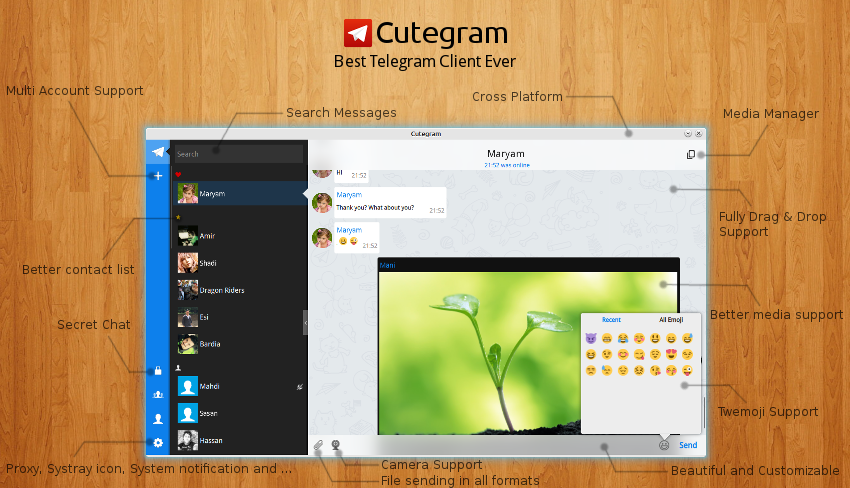
Cutegram is a completely free and open source graphical software project that has been designed from the offset to act as a Linux client for the Telegram messaging service. It offers an attractive and modern graphical user interface implemented in Qt.

Features at a glance
Key features include support for sending and receiving files, support for the system tray area of many open source desktop environments, native desktop notifications, customizable fonts, Twitter emojis, as well as support for all GNU/Linux operating systems.

Additionally, the software comes with complete drag & drop support for sending files, deleting messages and forwarding messages, an experimental secret chat, and a smooth and beautiful graphical user interface based on the latest QML technologies.

Another interesting features is that the program is independent of a desktop environment, thus supporting GNOME, KDE, Xfce, LXDE, Cinnamon, MATE, LXQt, Openbox, Fluxbox, and other open source desktop environments/window managers.

What's new in Cutegram 2.0.0:
  • Search
  • Secret Chat
  • Send text messages as document using drag and drop
  • Prxy support
  • Offline mode
  • Camera Button
  • Autostart option on Configure menu
  • Multi Account login (experimental)
  • Windowed Mode
  • ProgressBar on file sending
  • Cancel button on file downloading
  • Shared Media location
  • Many improvements on UserInterface
  • Better and Smarter drag and drop actions
  • Online status icon on contact avatars
  • Leave and Add person to chats
  • Delete History action
  • Chat with non-contact users
  • Add/Update translations.
  • Contact us menu to send suggestions to us
  • Linux, Windows and Mac support
  • Many other improvement and Bugfixes

Install Cutegram 2.0.0 on Ubuntu/Linux Mint (PPA), OpenSUSE, Mageia, Chakra Linux and Mac OSX :

to install Cutegram 2.0.0 on Ubuntu 15.04 vivid Vervet, ubuntu 14.10 Utopic Unicorn, Ubuntu 14.04 Trusty Tahr (LTS), Ubuntu 13.10/13.04/12.04, Linux Mint 17.1 Rebecca, Linux Mint 17 Qiana, Linux Mint 13 Maya, Pinguy OS 14.04, Elementary OS 0.3 Freya, Elementary OS 0.2 Luna, Peppermint Five, Deepin 2014, LXLE 14.04, Linux Lite 2.0, Linux Lite 2.2 and other Ubuntu derivative systems, open a new Terminal window and bash (get it?) in the following commands:

For Linux system 32 bit :
wget http://aseman.co/downloads/cutegram/2/cutegram_2.0.0-1-i386.deb

For Linux system 64 bit :
wget http://aseman.co/downloads/cutegram/2/cutegram_2.0.0-1-amd64.deb

Installation, do :
sudo dpkg -i cutegram_2.0.0-1-*.deb
In case “dpkg” indicates missing dependencies, complete the installation by executing the following command:
sudo apt-get install -f

Cutegram 2.0.0 available on PPA Launchpad

The source 32 & 64 bit is available now. Binary packages are in the process of being built, and will appear soon at their respective download locations.

Download for Mac OS X

FFmpeg 2.5.4 is out, Install on Ubuntu and Linux Mint via PPA

FFmpeg 2.5.4 is out, Install on Ubuntu 15.04 vivid Vervet, ubuntu 14.10 Utopic Unicorn, Ubuntu 14.04 Trusty Tahr (LTS), Ubuntu 13.10/13.04/12.04, Linux Mint 17.1 Rebecca, Linux Mint 17 Qiana, Linux Mint 13 Maya, Pinguy OS 14.04, Elementary OS 0.3 Freya, Elementary OS 0.2 Luna, Peppermint Five, Deepin 2014, LXLE 14.04, Linux Lite 2.0, Linux Lite 2.2 and other Ubuntu derivative systems via PPA

FFmpeg is an open source utility that allows Linux, Windows and Mac OS X users to playback, convert, record and stream video and audio files. It is used in almost all Linux distributions. It is a command-line software that can encode, decode, demux, mux, transcode, stream, play and filter almost any media format available. FFmpeg uses libavcodec, the most advanced audio/video codec library for Linux and UNIX-like systems.

Features at a glance

The software is comprised of a multimedia streaming server for live broadcasts, a simple media player based on the powerful SDL library, a simple multimedia stream analyzer, a library that contains functions for simplifying programming, and another library that includes muxers and demuxers for multimedia container formats. Additionally, it comes with support for input and output devices, media filters, a library for performing highly optimized image scaling and color space/pixel format conversion operations, and a library for performing highly optimized audio rematrixing, resampling and sample format conversions.

What's new in FFmpeg 2.5.4:
  • 2.5.4 was released on 2015-02-13. It is the latest stable FFmpeg release from the 2.5 release branch, which was cut from master on 2014-12-15. Amongst lots of other changes, it includes all changes from ffmpeg-mt, libav master of 2014-12-03, libav 11 as of 2014-12-03.
It includes the following library versions:
  • libavutil 54. 15.100
  • libavcodec 56. 13.100
  • libavformat 56. 15.102
  • libavdevice 56. 3.100
  • libavfilter 5. 2.103
  • libavresample 2. 1. 0
  • libswscale 3. 1.101
  • libswresample 1. 1.100
  • libpostproc 53. 3.100
  • 2.5.4 was released on 2015-02-13. It is the latest stable FFmpeg release from the 2.5 release branch, which was cut from master on 2014-12-15. Amongst lots of other changes, it includes all changes from ffmpeg-mt, libav master of 2014-12-03, libav 11 as of 2014-12-03.
  • It includes the following library versions:
  • libavutil 54. 15.100
  • libavcodec 56. 13.100
  • libavformat 56. 15.102
  • libavdevice 56. 3.100
  • libavfilter 5. 2.103
  • libavresample 2. 1. 0
  • libswscale 3. 1.101
  • libswresample 1. 1.100
  • libpostproc 53. 3.100
To install FFmpeg 2.5.4 on Ubuntu 15.04 vivid Vervet, ubuntu 14.10 Utopic Unicorn, Ubuntu 14.04 Trusty Tahr (LTS), Ubuntu 13.10/13.04/12.04, Linux Mint 17.1 Rebecca, Linux Mint 17 Qiana, Linux Mint 13 Maya, Pinguy OS 14.04, Elementary OS 0.3 Freya, Elementary OS 0.2 Luna, Peppermint Five, Deepin 2014, LXLE 14.04, Linux Lite 2.0, Linux Lite 2.2 and other Ubuntu derivative systems, open a new Terminal window and bash (get it?) in the following commands:

sudo add-apt-repository ppa:jon-severinsson/ffmpeg
sudo apt-get update
sudo apt-get install ffmpeg
sudo apt-get install frei0r-plugins
To remove FFmpeg 2.5.4 in Ubuntu derivative system, do :
sudo apt-get remove ffmpeg
Converting videos and audios has never been so easy.
ffmpeg -i input.mp4 output.avi

The source is available now. Binary packages are in the process of being built, and will appear soon at their respective download locations.

Friday, 13 February 2015

MKVToolnix 7.6.0 is out, The ultimate MKV (Matroska) manipulation software for Linux-based operating systems


MKVToolnix 7.6.0 is out, available for Ubuntu, Linux Mint, Debian, Arch Linux, CentOS, Fedora, OpenSUSE, FreeBSD, Gentoo, Mandriva, Slackware, Windows and Zenwalk


MKVToolnix is an open source set of command-line and graphical utilities that empower users to extract streams from MKV files, display information about MKV files, merge several MKV streams into one, and split Matroska media files. The resulting files from MKVToolnix can be played back with various media players on Linux/UNIX, or with the Matroska Direct Show filters under Windows operating systems.

Supports a wide range of audio and subtitle formats

In addition, the mkvextract program can be used to extract audio, subtitle and video tracks, chapters, tags, CUE sheets, attachments and timecodes from Matroska files. At the moment, it supports the following track types: H.264/AVC, RealVideo, Theora, VP8/VP9, MP2, MP3, AC3, raw PCM, AAC, OGG Vorbis, TrueAudio, ALAC, FLAC, WavPack, Opus, SSA, ASS, Kate, VobSub, and USF.

Edit the properties of MKV files or view detailed information

The mkvinfo program is capable of displaying detailed information about all the elements that are included in a Matroska file. It outputs a list of tracks and provides information about the codecs used in them.

Advanced users can use the mkvpropedit tool to edit the properties of a MKV file without a complete remux. There’s also a GUI front-end for the mkvextract tool, called mmg, designed to used for editing a chapters and headers.

Supported operating systems

MKVToolnix is a platform-independent project that supports Linux (Gentoo, Arch Linux, CentOS, Red Hat Enterprise Linux, Fedora, Debian, Ubuntu, Mandriva, openSUSE, Slackware, Zenwalk), BSD (FreeBSD, NetBSD), Mac OS X and Microsoft Windows operating systems.


What's new in MKVToolnix 7.6.0:
  • all programs: bug fix: Since release 7.0.0 the wrong exit code was used when warnings were finished (0 instead of 1). Fixes #1101.
  • mkvmerge: bug fix: Appending chapters with the same chapter UID was dropping all sub-chapters from the one of the two merged chapters. Now the sub-chapters are merged recursively as well.
  • mkvmerge: bug fix: The wrong Codec ID was written when reading PCM tracks from Matroska files in Big Endian byte order. Fixes #1113.
  • all: new feature: added a Serbian (Latin) translation of the programs by Danko (see AUTHORS).
  • mkvmerge: bug fix: If splitting was active and AC3 tracks read from Matroska files were shorter than a split point then the following output file would contain an AC3 packet with the timecode of 00:00:00 somewhere in the middle. Fixes #1104.
  • mmg: bug fix: If a chapter track from a Matroska file is selected then the »language« drop-down box is disabled. Fixes #1105.
  • mkvmerge: bug fix: On Windows the end-of-file-reached status wasn't tracked correctly for certain file operations. This could manifest in e.g. mkvmerge not finding tracks in MPEG transport streams when probing MPLS playlist files. Fixes #1100.
  • mmg: bug fix: When scanning for play lists the window presenting the results listed some properties in an unescaped way (e.g. »\s« instead of spaces).
  • mmg: bug fix: When adding MPLS files mmg was only offering to scan for more playlists if there were at least two additional MPLS files present. This has been fixed to one MPLS file (in addition to the one just added).

For Full information about installation you can follow this page.

Viber 5.0 is released, Available for Ubuntu, Linux Mint, Debian and Fedora


Viber 5.0 is released, A free and multi-platform messaging, VoIP, and video calling desktop application and Available for Ubuntu, Linux Mint, Debian and Fedora

Viber is a free and cross-platform software project that allows you to make free calls or send free text messages to your family members, friends and colleagues who use Viber on a supported operating system. It is also possible to make calls or send SMS messages to any mobile network or device, in any country.

Requires no registration, invitation or passwords

Viber is extremely easy to use, no registration, invitation or passwords is required to make free calls to other Viber users. You just download and install the application on your Linux box (see below for supported distributions) in order to make free voice calls or send text messages.

It has only been tested with Ubuntu

Officially, the application has only been tested with Ubuntu, world’s most popular free operating system, supporting both 32-bit and 64-bit hardware platforms. Being distributed as a DEB file, Viber can be easily installed on other Ubuntu-based OSes, as well as Debian-based distributions. It can also be easily installed on other Linux distros from their default software repositories (e.g. Arch Linux).

Viber for Linux lets you send free messages and make free calls to other Viber users on any device and network, in any country! Viber syncs your contacts and messages with your mobile device.
  • Text, photo and sticker messages
  • Group conversations
  • Call any Viber user for free
  • Full sync between your mobile and your Linux
  • Transfer ongoing calls between your mobile and your desktop
  • No registration, passwords or invitations required
  • Tested on: Ubuntu, Fedora
Download for Ubuntu, Linux Mint, Debian derivative system :

To Install/Update Viber 5.0  on Ubuntu 15.04 vivid Vervet, ubuntu 14.10 Utopic Unicorn, Ubuntu 14.04 Trusty Tahr (LTS), Ubuntu 13.10/13.04/12.04, Linux Mint 17.1 Rebecca, Linux Mint 17 Qiana, Linux Mint 13 Maya, Pinguy OS 14.04, Elementary OS 0.3 Freya, Elementary OS 0.2 Luna, Peppermint Five, Deepin 2014, LXLE 14.04, Linux Lite 2.0, Linux Lite 2.2 and other Ubuntu derivative systems, open a new Terminal window and bash (get it?) in the following commands:
wget -c http://download.cdn.viber.com/cdn/desktop/Linux/viber.deb
sudo dpkg -i viber.deb
sudo rm -rf viber.deb
In case “dpkg” indicates missing dependencies, complete the installation by executing the following command:
sudo apt-get install -f
Download for Fedora and Redhat Derivative system.
wget http://download.cdn.viber.com/desktop/Linux/viber.rpm
sudo yum install viber.rpm

Cyphertite 2.0.4 is released, available for GNU/Linux (Ubuntu, openSUSE, Fedora), BSD (FreeBSD and OpenBSD), and Microsoft Windows (Windows 8, Windows 7, Vista, XP, Server 2003, and Server 2008)


Cyphertite 2.0.4 released, The most secure, encrypted and powerful tar-like remote archive application for UNIX

Cyphertite is a free, cross-platform and open source command-line application designed to enable users to easily create remote and highly encrypted backups. It can also be used as an encrypted file storage powered by the strongest standards-compliant cryptography available, Cyphertite real privacy and protection, with no questionable security protocols.

Cyphertite 2.0.4 Supported on Linux, BSD, Windows and Mac OS X

Cyphertite is a true cross-platform application, designed to work on numerous operating system, including GNU/Linux (Ubuntu, openSUSE, Fedora), BSD (FreeBSD and OpenBSD), and Microsoft Windows (Windows 8, Windows 7, Vista, XP, Server 2003, and Server 2008). Supported hardware architectures include 32 and 64-bit.

What's new in Cyphertite 2.x.x:
  • The Windows version has a new look and feel.
  • The landing page is broken up into four “live” tiles that update in real-time to provide contextual information to the user.
  • The tiles also provide navigation into the four major areas in the product: Create, Browse, Status, and Settings.
  • This release strives to make each of these areas clear, concise, and linear.
The source is available now. Binary packages are in the process of being built, and will appear soon at their respective download locations.

Wednesday, 11 February 2015

ModemManager 1.4.4 is out, This Open Source project provides a mobile broadband communication API for Linux


ModemManager 1.4.4 is out, This Open Source project provides a mobile broadband communication API for Linux

ModemManager is an open source command-line software that tries to provide a unified high level API for communicating with mobile broadband modems on the Linux operating system. It is designed as a free/libre drop-in replacement for the NetworkManager application.

It is a system daemon, designed to control mobile broadband devices, such as USB dongles, professional RS232 and USB devices, bluetooth-paired smartphones, or built-in devices, as well as modem connections, supporting 2G, 3G and 4G.

What's new in ModemManager 1.4.4:
  • Use 'DMS Set FCC Authentication' if online mode fails in QMI modems. This change requires bumping the libqmi version to 1.12.4, which is the stable release including the change.
  • Fix segfault when empty pdp type string is given.
  • Fix segfault when port driver is unknown.
  • Blacklist: ignore PalmOS devices driven by 'visor'
Supports a wide range of modem vendors

ModemManager supports numerous modem vendors, among which we can mention Altair, AnyDATA, Blackberry, Cinterion, Ericsson, Huawei, Infineon, Iridium, Linktop, MediaTek, Motorola, Nokia, Novatel, Olivetti, Option, Pantech, Qualcomm, Samsung, Simtech, Sierra, Wireless, VIA, Wavecom, and ZTE.

Being a command-line program, ModemManager comes with various command-line options that help you interact better with modem devices. Among these options, we can mention support for running in session DBus, the ability to disable auto-scan of devices, support for enabling the Test Interface in the daemon, as well as the ability to add the the location of plugins.

The source is available now. Binary packages are in the process of being built, and will appear soon at their respective download locations.