Sunday, 25 January 2015

How to install Google Earth Stable on Debian Derivative System via PPA

How to install Google Earth Stable on Debian Derivative System via PPA

How to install Google Earth Stable on Debian 8 "jessie" (upcoming), Debian 7 "wheezy", Debian 6 "squeeze", Kali linux 1.0.9, Kali Linux 1.0.8 (and old version 1.0.7, 1.0.6, 1.0.5), KNOPPIX, Kanotix, Astra Linux, Blankon Linux 9.0 suroboyo,  Blankon Linux 8.0 rote , Blankon Linux 10.0 tambora (upcoming) and old version 7.0, Univention Corporate Server and debian derivative system  via PPA

Google Earth is a virtual globe, map and geographical information program that was originally called EarthViewer 3D created by Keyhole, Inc, a Central Intelligence Agency (CIA) funded company acquired by Google in 2004 (see In-Q-Tel). It maps the Earth by the superimposition of images obtained from satellite imagery, aerial photography and geographic information system (GIS) 3D globe. It was originally available with three different licenses, but has since been reduced to just two: Google Earth (a free version with limited function) and Google Earth Pro ($399 per year), which is intended for commercial use. The third original option, Google Earth Plus, has been discontinued.

How to install Google Earth Stable on Debian Derivative System via PPA :

Install the repository GPG key:
# wget -q -O - https://dl-ssl.google.com/linux/linux_signing_key.pub | sudo apt-key add -
Add the following line to /etc/apt/sources.list:
deb http://dl.google.com/linux/earth/deb/ stable main
Update the package index:
# sudo apt-get update
Install google-earth-stable deb package:
# sudo apt-get install google-earth-stable
For install offline, you can follow this page for download deb file.
 
Home Google Earth

How to Install VirtualBox 4.3 on ubuntu 14.10 Utopic Unicorn via PPA


How to Install VirtualBox 4.3 on ubuntu 14.10 Utopic Unicorn via PPA

VirtualBox is a powerful PC virtualization solution allowing you to run a wide range of PC operating systems on your Linux system. This includes Windows, Linux, FreeBSD, DOS, OpenBSD and others. VirtualBox comes with a broad feature set and excellent performance, making it the premier virtualization software solution on the market.

VirtualBox is being actively developed with frequent releases and has an ever growing list of features, supported guest operating systems and platforms it runs on. VirtualBox is a community effort backed by a dedicated company: everyone is encouraged to contribute while Oracle ensures the product always meets professional quality criteria.

Changelog 4.3.20 :

This is a maintenance release. The following items were fixed and/or added:
  • VMM: fixed reboot hang of 32-bit Windows SMP guests (bug #13319, #13462)
  • VMM: proper Math Fault handling with certain legacy guests (bug #9042, AMD hosts)
  • VMM: fixed a Guru Meditation VINF_EM_TRIPLE_FAULT on older CPUs that don't support MSR-bitmaps (VT-x only; bugs #13034, #13125, #13311, #13425, #13426, #13463,

To Install VirtualBox 4.3 on ubuntu 14.10 Utopic Unicorn via PPA :

Install the repository GPG key:  
# wget -q -O - http://download.virtualbox.org/virtualbox/debian/oracle_vbox.asc | sudo apt-key add - 
Add the following line to /etc/apt/sources.list: 
deb http://download.virtualbox.org/virtualbox/debian/ utopic contrib
Update the package index:
# sudo apt-get update
Install virtualbox-4.3 deb package:
# sudo apt-get install virtualbox-4.3
The source is available now. Binary packages are in the process of being built, and will appear soon at their respective download locations.

Install google chrome stable 40.0.2214.91 on Ubuntu 14.10 Utopic Unicorn via PPA


Install google chrome stable 40.0.2214.91 on Ubuntu 14.10 Utopic Unicorn via PPA

Google Chrome, or Chrome, is a web browser software that tries to compete with major players, such as Mozilla Firefox, Internet Explorer, Safari, and even the Opera web browser. It is available for the Linux, Android, iOS, Microsoft Windows, and Mac OS X operating systems. But Google Chrome is more than a web browser, as it combines sophisticated open source technology, borrowed from the Chromium application, into a minimal design, all in order to help users surf the web much faster, a lot easier, and safer than ever before.

A unique functionality of the Google Chrome application is its ability to search the web directly from the address bar. Just type one or more words in the address bar and immediately get suggestions for popular web pages. The application displays thumbnails of your top websites on the new tab page, a function that is popularly called Speed Dial. This functionality is also available on other similar products, and it allows you to easily access your favorite web pages instantly, with lightning speed, from any new tab. - See more at: http://media-opensource.blogspot.com/2015/01/google-chrome-390217199-400221485-beta.html#sthash.QyDAwU7o.dpuf
 A unique functionality of the Google Chrome application is its ability to search the web directly from the address bar. Just type one or more words in the address bar and immediately get suggestions for popular web pages. The application displays thumbnails of your top websites on the new tab page, a function that is popularly called Speed Dial. This functionality is also available on other similar products, and it allows you to easily access your favorite web pages instantly, with lightning speed, from any new tab.


How to Install google chrome stable 40.0.2214.91 on Ubuntu 14.10 Utopic Unicorn via PPA

For Linux System 32 Bit :

Download google-chrome-stable_40.0.2214.91-1_i386.deb for Debian, Ubuntu
from the Google repository.

Install the repository GPG key: 
# wget -q -O - https://dl-ssl.google.com/linux/linux_signing_key.pub | sudo apt-key add -
Add the following line to /etc/apt/sources.list:
deb http://dl.google.com/linux/deb/ stable main
Update the package index:
# sudo apt-get update
Install google-chrome-stable deb package:
# sudo apt-get install google-chrome-stable

For Linux System 64 Bit :

Download google-chrome-stable_40.0.2214.91-1_amd64.deb for Debian, Ubuntu
from the Google repository.

Install the repository GPG key: 
# wget -q -O - https://dl-ssl.google.com/linux/linux_signing_key.pub | sudo apt-key add -
Add the following line to /etc/apt/sources.list:
deb http://dl.google.com/linux/deb/ stable main
Update the package index:
# sudo apt-get update
Install google-chrome-stable deb package:
# sudo apt-get install google-chrome-stable

Friday, 23 January 2015

GNOME 3.15.4 release, developers preview version

GNOME 3.15.4

GNOME 3.15.4 release, developers preview version

GNOME 3 is an easy and elegant way to use your computer. It is designed to put you in control and bring freedom to everybody. GNOME 3 is developed by the GNOME community, a diverse, international group of contributors that is supported by an independent, non-profit foundation.

The GNOME development platform is also an important part of the GNOME desktop environment, providing an extensive, developer-friendly framework for building applications that integrate into the rest of the desktop. With GNOME, the user is in control of everything, as the desktop is simple and easy to use, helping you get things done quickly. It is finely crafted and gives you easy access to all of your data.

What's new in GNOME 3.15.4:
Among the new things in this snapshot, you can find clutter using the GDK backend, libinput used in multiple modules (we require libinput 0.8), gnome-shell using vp9 for screencasts, mutter using GTK+ themes, input configuration under Wayland, scrolling changes in GTK+, improved search in gnome-software, a new game (gnome-taquin), and many more.

Default applications

Default applications include the Baobab disk usage analyzer, Brasero CD/DVD burning software, Cheese webcam utility, Empathy instant messenger, Devhelp documentation browser, Anjuta IDE, Evince document viewer, Eye of GNOME image viewer, File Roller archive manager, Evolution mail, contacts, and calendar suite, Totem media player, Seahorse PGP and SSH key-manager, Orca screen-reader, Vinagre VNC client, Gedit text editor, and Nautilus file manager.

In addition, the following GNOME apps are available: Gcalctool, Glade, Boxes, Color Manager, Contacts, Control Center, Dictionary Dictionary, Disks, Documents, Font Viewer, Keyring Manager, Screenshot, Sound Recorder, Logs, System Monitor, Terminal, Gucharmap, and an impressive collection of games.

GNOME 3.15.4 release, developers preview version

 
Related Links :

New features:

GNOME 3.15.4 is now available at:

More details see the release notes.

GNOME is a support multiple platform development & desktop environment that can run on, including GNU / Linux (commonly called Linux), Solaris, HP-UX, BSD and Apple's Darwin system GNOME has many powerful features, such as: High smooth text rendering quality, and availability of the first international support, and includes support for the reverse text (Note: in some countries, the text is right-to-left layout). 

Wine 1.7.35 released, you can install on Ubuntu 15.04 vivid Vervet, ubuntu 14.10 Utopic Unicorn, Ubuntu 14.04 Trusty Tahr (LTS) and Linux Mint 17.1 Rebecca, Linux Mint 17 Qiana

 
Wine 1.7.35

Wine 1.7.35 released, you can install on Ubuntu 15.04 vivid Vervet, ubuntu 14.10 Utopic Unicorn, Ubuntu 14.04 Trusty Tahr (LTS) and Linux Mint 17.1 Rebecca, Linux Mint 17 Qiana via PPA

Wine stands for "Wine is not an emulator" and it is an open source command-line software that's capable of translating Windows API calls into POSIX calls on-the-fly for integrating Windows applications into your Linux/UNIX desktop. For regular Linux users, the above means that the Wine software will allow them to run applications which are designed to be installed only on Microsoft Windows operating systems.

The Wine development release 1.7.35 is now available.
What's new in this release:
  • Beginnings of support for OpenGL core contexts.
  • Initial support for glyph placement in DirectWrite.
  • Some more WBEM objects.
  • Various bug fixes.

Numerous GUIs exist

PlayOnLinux, Crossover, Q4Wine, Bordeaux, Pipelight, Swine, WineXS, and winetricks are some of the most popular Wine GUI (Graphical User Interface) front-ends on Linux. On Mac OS X you can use the Wineskin, WineBottler and osxwinebuilder apps. Also, the application is not only supported on the Linux platform, as it is also compatible with other POSIX-compliant operating systems, such as BSD (FreeBSD, PC-BSD), OpenSolaris, and Mac OS X.
 

How to install Wine 1.7.35 on Ubuntu 15.04 vivid Vervet, ubuntu 14.10 Utopic Unicorn, Ubuntu 14.04 Trusty Tahr (LTS) and Linux Mint 17.1 Rebecca, Linux Mint 17 Qiana :

Because it is available via PPA, installing Winehq 1.7.35 (development) on the listed Ubuntu, Linux Mint and Elementary OS systems is easy. All you have to do is add the ppa to your system, update the local repository index and install the wine package. Like this:

sudo add-apt-repository ppa:ubuntu-wine/ppa
sudo apt-get update
sudo apt-get install wine1.7 winetricks

Optional, to remove Wine 1.7.35 and winetricks, open a new Terminal window and bash (get it?) in the following commands:
sudo apt-get remove wine1.7 winetricks
How to Completely removing Wine:
sudo apt-get remove wine
rm -rf $HOME/.wine
rm -f $HOME/.config/menus/applications-merged/wine*
rm -rf $HOME/.local/share/applications/wine
rm -f $HOME/.local/share/desktop-directories/wine*
rm -f $HOME/.local/share/icons/????_*.xpm

The source is available now. Binary packages are in the process of being built, and will appear soon at their respective download locations.  

Thursday, 22 January 2015

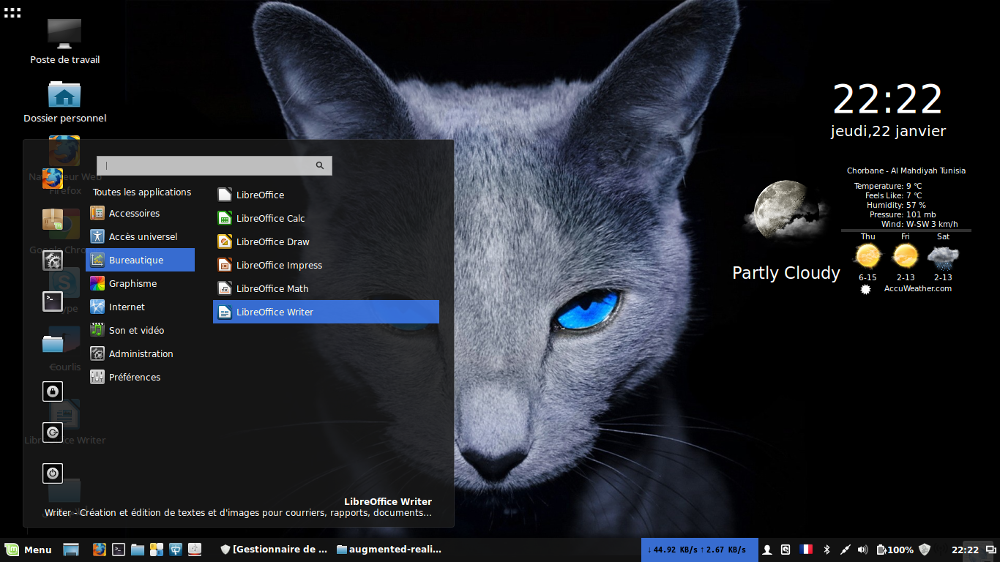
Entelechy 0.1 Cinnamon Theme for Linux Mint 17.1 Rebecca, Linux Mint 17 Qiana


Entelechy 0.1 Cinnamon Theme for Linux Mint 17.1 Rebecca, Linux Mint 17 Qiana


Entelechy is perfection, the essence fully realized. It\'s a vital force that directs an human to singularity. This is not an attempt, is an achievement.

The idea of Entelechy was inspired by themes such as Divergence IV and Zorin OS 8, but with a proposal somewhat... different. We don\'t have help from compiz, since the current implementation of gnome has practically everything incompatible, then our right arm is window managers such as metacity and derivatives.

This work and all files in this repository is licensed under a CC-BY-NC-SA 4.0 International License.

TODO:
- Gtk+2 theme
- Gtk+3 theme
- Transparent window borders (Why metacity don\'t support alpha layer???)
- Icon theme
- Cursor theme

Download cinnamon theme
Download Conky
Download Metacity theme

Fontinella 1.0 | Cinnamon Theme for Linux Mint 17.1 Rebecca, Linux Mint 17 Qiana


Fontinella 1.0 | Cinnamon Theme for Linux Mint 17.1 Rebecca, Linux Mint 17 Qiana

Download